

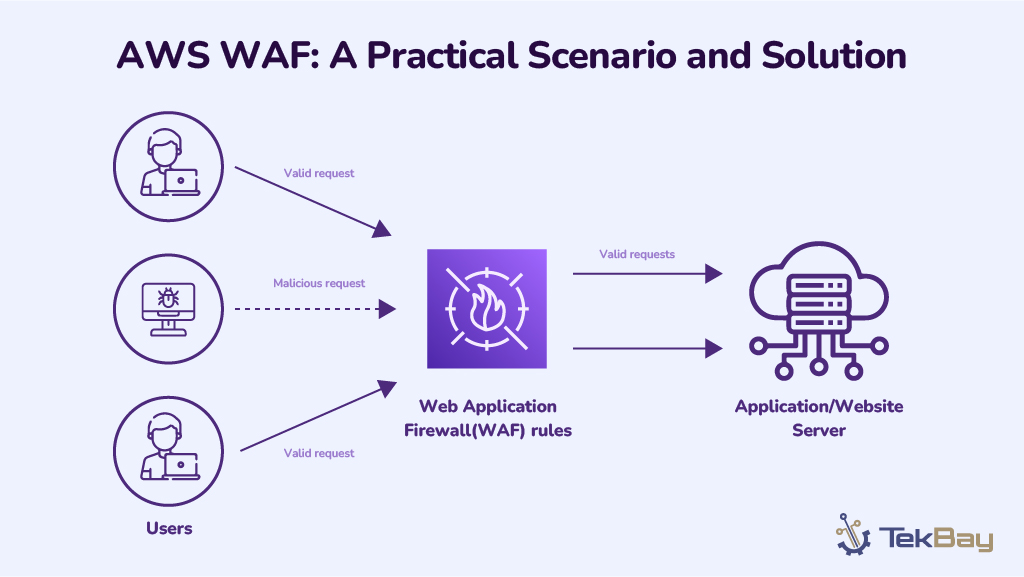
While the shift to cloud infrastructure offers organizations benefits like flexibility and cost efficiency, securing applications requires more than simply migrating to the cloud.
To stay ahead of evolving cyber threats, you need an innovative yet robust approach, and the AWS WAF (Web Application Firewall) is your go-to option.
Designed to address modern security challenges, the AWS WAF prevents common web exploits like SQL injection, Cross-Site Scripting (XSS), and DDoS attacks. It acts as the first line of defense by blocking malicious requests before they reach your servers.
This blog will discuss a practical problem scenario in which AWS WAF secures a web application infrastructure. We’ll also discuss the steps needed to implement AWS WAF as part of the solution.
A Peek Into Soaring Cybercrime Costs
According to an IBM report, the cost of a data breach in 2024 was $4.88 million (the highest-ever), and as per Cybersecurity Ventures, the global cost of cybercrime damage is projected to be $10.5 trillion per annum by 2025.
As reported, in May 2023, the DPC fined $1.3 billion (€1.2 billion) to the social media giant Meta, the biggest data breach fines.
A single vulnerability, such as an unprotected SQL injection or a poorly defended DDoS attack, can be the Achilles’ heel that brings your entire operation to a halt.
Problem Scenario
A growing e-commerce platform is experiencing frequent malicious attempts to compromise its web applications. The company noticed repeated attempts at SQL injections and cross-site scripting (XSS) attacks. These attacks pose a serious risk to user data and the overall stability of the platform.
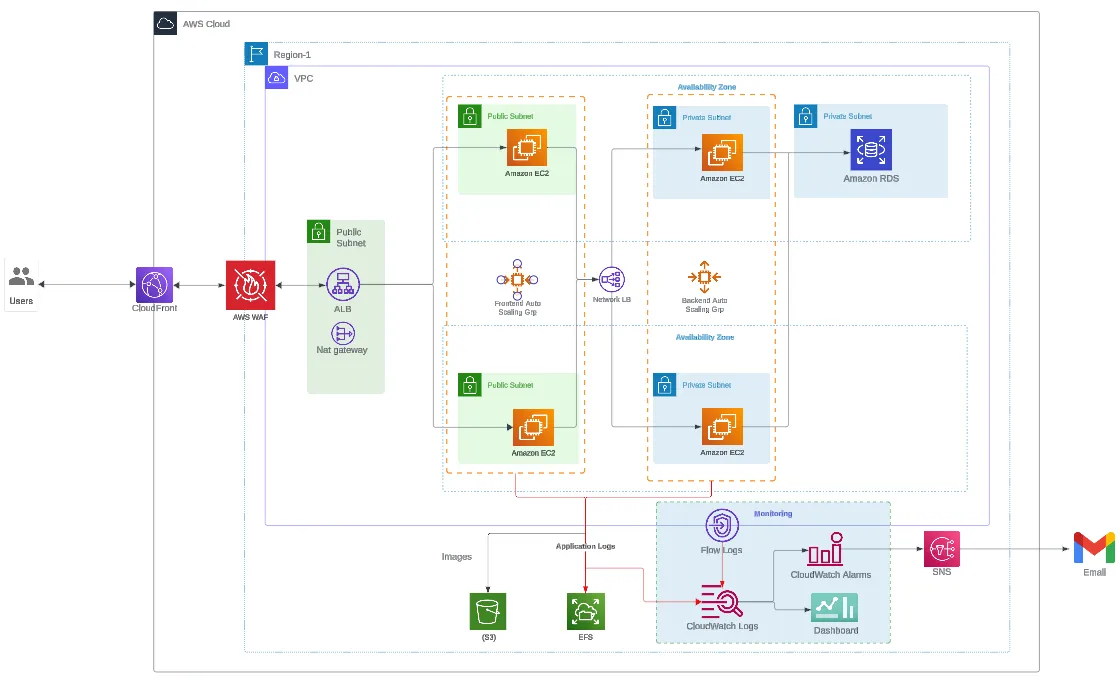
The web application is hosted on Amazon EC2 instances, and the architecture includes CloudFront as the content delivery network (CDN) and Application Load Balancer (ALB) to distribute traffic across multiple instances.
While the application performs well under normal conditions, the security team identified significant gaps in protecting the web layer from potential threats. Specifically, they need to safeguard the application from:
- SQL Injection attempts
- Cross-site scripting (XSS) attacks
- Bot traffic causing unnecessary load on the servers
Proposed Solution: Implement AWS WAF
To tackle these issues, we propose implementing AWS Web Application Firewall (WAF) as a protective shield for the e-commerce platform. AWS WAF will be integrated with CloudFront and the Application Load Balancer (ALB) to filter incoming traffic and block malicious requests before they reach the web servers.
The solution will consist of the following key steps:
- Deploy AWS WAF: To protect the application, set up AWS WAF. WAF will be configured to inspect HTTP and HTTPS requests and block malicious requests based on defined rules.
- Define Web ACL Rules: Create a Web Access Control List (Web ACL) with rules that address SQL injection, XSS, and bot traffic.
- Integration with CloudFront and ALB: Integrate AWS WAF with CloudFront and ALB to protect all incoming traffic and enforce security policies across multiple layers.
- Monitoring and Alerts: Enable logging and monitoring using CloudWatch and SNS for real-time alerts on suspicious activity.
You can also read about the Guidelines for Implementing AWS WAF.
Prerequisites:
- AWS Accounts with necessary permissions
- You must have Terraform installed on your local machine
- AWS ALB or Cloudfront to Integrate with AWS WAF
Terraform Configuration for AWS WAF
The following Terraform configuration demonstrates how to deploy AWS WAF with essential rules and integrate it with ALB.
### main.tf
module "WAFv2" {
   source  = "boldlink/waf/aws"
   version = "1.0.3"

   name                   = local.waf.name
   scope                  = local.waf.scope
   web_acl_resource_arn   = module.alb.arn
   depends_on             = [module.alb]
   create_acl_association = true
   rules = [
     # OWASP Rule Set (Common Rules)
     {
       name = "${local.waf.name}-CommonRules"
       override_action = {
         none = {}
       }
       priority = 0
       statement = {
         managed_rule_group_statement = {
           name        = "AWSManagedRulesCommonRuleSet"
           vendor_name = "AWS"
         }
       }
       visibility_config = {
         cloudwatch_metrics_enabled = false
         metric_name                = "${local.waf.name}-CommonRules"
         sampled_requests_enabled   = false
       }
     },

     # SQL Injection Rule Set
     {
       name = "${local.waf.name}-SQLiRules"
       override_action = {
         none = {}
       }
       priority = 1
       statement = {
         managed_rule_group_statement = {
           name        = "AWSManagedRulesSQLiRuleSet"
           vendor_name = "AWS"
         }
       }
       visibility_config = {
         cloudwatch_metrics_enabled = true
         metric_name                = "${local.waf.name}-SQLiRules"
         sampled_requests_enabled   = false
       }
     },

     # Known Bad Inputs Rule Set
     {
       name = "${local.waf.name}-BadInputsRules"
       override_action = {
         none = {}
       }
       priority = 3
       statement = {
         managed_rule_group_statement = {
           name        = "AWSManagedRulesKnownBadInputsRuleSet"
           vendor_name = "AWS"
         }
       }
       visibility_config = {
         cloudwatch_metrics_enabled = true
         metric_name                = "${local.waf.name}-BadInputsRules"
         sampled_requests_enabled   = false
       }
     },

     # Linux Rule Set
     {
       name = "${local.waf.name}-LinuxRules"
       override_action = {
         none = {}
       }
       priority = 6
       statement = {
         managed_rule_group_statement = {
           name        = "AWSManagedRulesLinuxRuleSet"
           vendor_name = "AWS"
         }
       }
       visibility_config = {
         cloudwatch_metrics_enabled = true
         metric_name                = "${local.waf.name}-LinuxRules"
         sampled_requests_enabled   = false
       }
     },

     # Admin Protection Rule Set
     {
       name = "${local.waf.name}-AdminProtection"
       override_action = {
         none = {}
       }
       priority = 6
       statement = {
         managed_rule_group_statement = {
           name        = "AWSManagedRulesAdminProtectionRuleSet"
           vendor_name = "AWS"
         }
       }
       visibility_config = {
         cloudwatch_metrics_enabled = true
         metric_name                = "${local.waf.name}-AdminProtection"
         sampled_requests_enabled   = false
       }
     }
   ]
}
Visit the AWS documentation about best practices for intelligent threat mitigation in AWS WAF.
Visual Insights Of AWS WAF Configuration
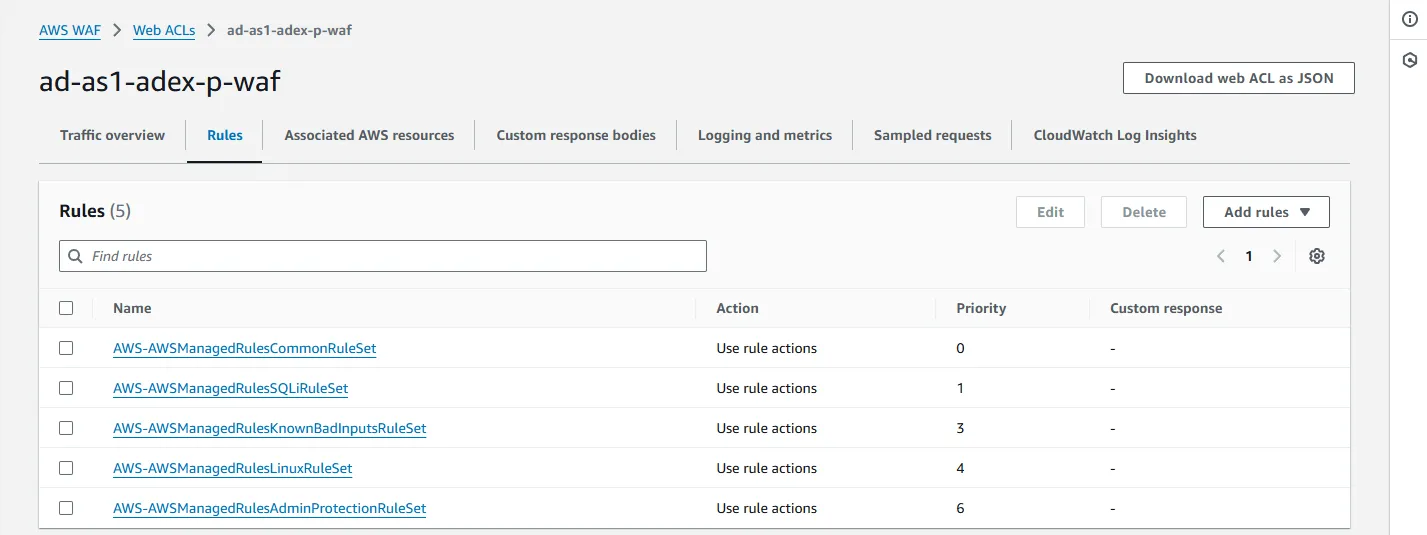
1) WAF Rule List
The following screenshot shows the list of AWS WAF rules configured for the e-commerce platform. These rules include AWS-managed rule sets designed to protect the application from various threats, such as SQL injections, cross-site scripting (XSS), and bot traffic.
Each rule set is customized with specific actions (e.g., allowing, blocking, and counting) based on the application’s identified needs.
2) WAF Integration to ALB
This diagram illustrates how the e-commerce platform’s architecture integrates AWS WAF with the application load balancer (ALB).
AWS WAF acts as a protective layer between incoming traffic and the ALB, filtering malicious requests before they can reach the web servers. By associating the WAF with the ALB, traffic is inspected and managed based on the configured rules.

3) Traffic Breakdown (Total, Allowed, and Blocked)
The following chart provides a breakdown of the total traffic received by the platform, including the number of allowed and blocked requests. This helps to visualize how effective the WAF is in filtering malicious traffic.
As shown, most traffic is legitimate (allowed), but a significant portion of requests are blocked, highlighting the active protection provided by AWS WAF.

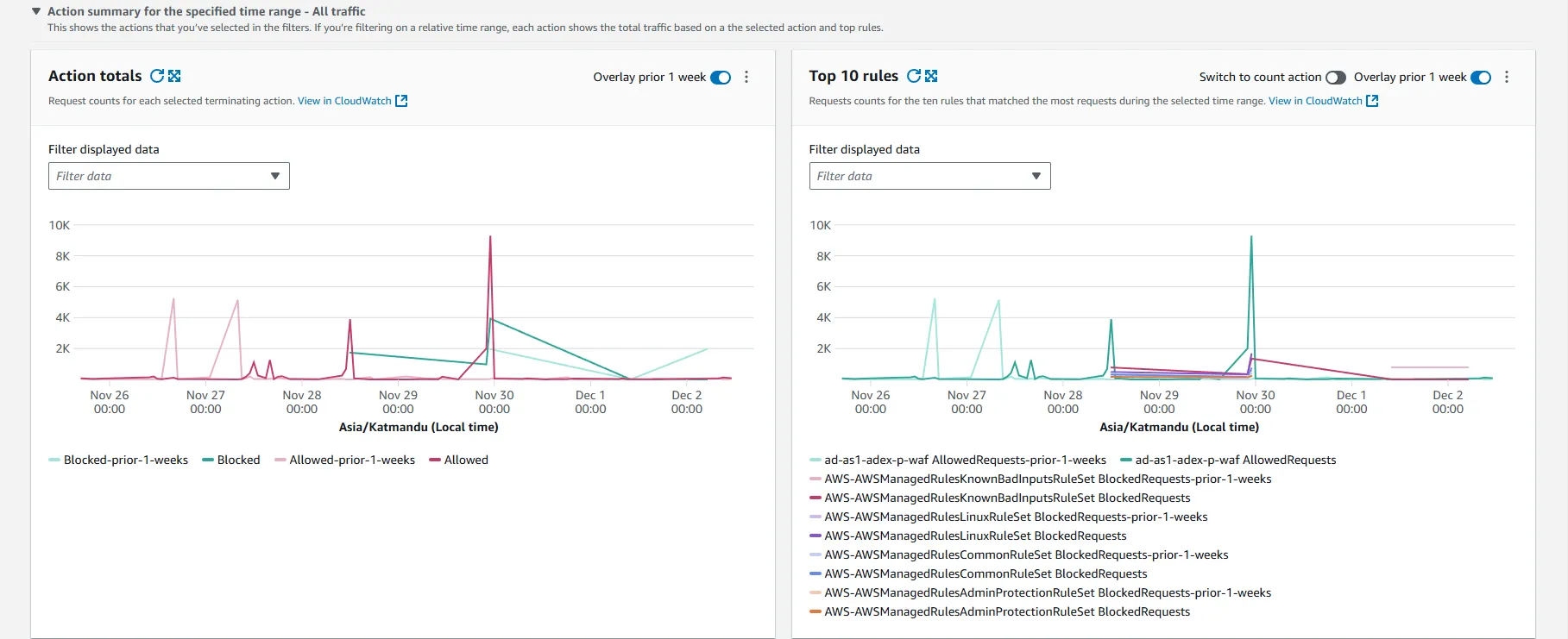
4) Graph of Action Totals and Top 10 Rules
This graph provides insights into the total actions taken by AWS WAF, including the number of requests allowed, blocked, or counted, and the top 10 most active rules.
This is crucial for identifying which security rules are triggered most frequently, helping the security team fine-tune the WAF configuration for better performance and protection.
Conclusion
AWS WAF is a powerful tool in your cloud security arsenal. By leveraging its features and following best practices, you can significantly enhance the protection of your web applications against various threats and attacks.
Happy learning!














