

Deploying a CRUD application on AWS Lambda offers the advantage of serverless architecture, enabling scalability and cost-efficiency.
We will combine the simplicity of SAM for managing the serverless components with the power of Terraform for defining infrastructure-as-code (IaC) to provide a step-by-step guide for deploying a Serverless CRUD application in AWS, ensuring it is repeatable and manageable.
By the end of this article, you’ll have a fully functional Serverless CRUD application integrated with an Amazon RDS MySQL database.
Key Concepts and Tools: Why Use Them?
1) Serverless Application Model (SAM): An open-source framework from AWS that makes building, testing, and deploying serverless applications more accessible.
SAM extends AWS CloudFormation by simplifying the syntax for defining serverless components such as Lambda functions, API Gateway, DynamoDB tables, and Step Functions.
It allows developers to focus on business logic instead of managing infrastructure. With SAM, you can test and debug locally, package applications into deployable artifacts, and quickly deploy them to AWS using the SAM deploy command.
2) Terraform: It is an open-source infrastructure-as-code (IaC) tool by HashiCorp that lets you define, provision, and manage cloud infrastructure across multiple providers, such as AWS, Azure, and Google Cloud.
Using declarative configuration files, Terraform automatically provisions and updates infrastructure to match your desired state.
3) Amazon RDS (Relational Database Service): AWS RDS is a managed database service that simplifies setting up, operating, and scaling relational databases like MySQL, PostgreSQL, and SQL Server. AWS handles backups, patching, failover, and scaling so you can focus on your application.
Prerequisites
- Basic knowledge of AWS services (VPC, Lambda, API Gateway, and RDS).
- AWS CLI, AWS SAM CLI, and Terraform installed.
- An IAM User/Role with permissions for Lambda, API Gateway, RDS, and related services.
Architecture
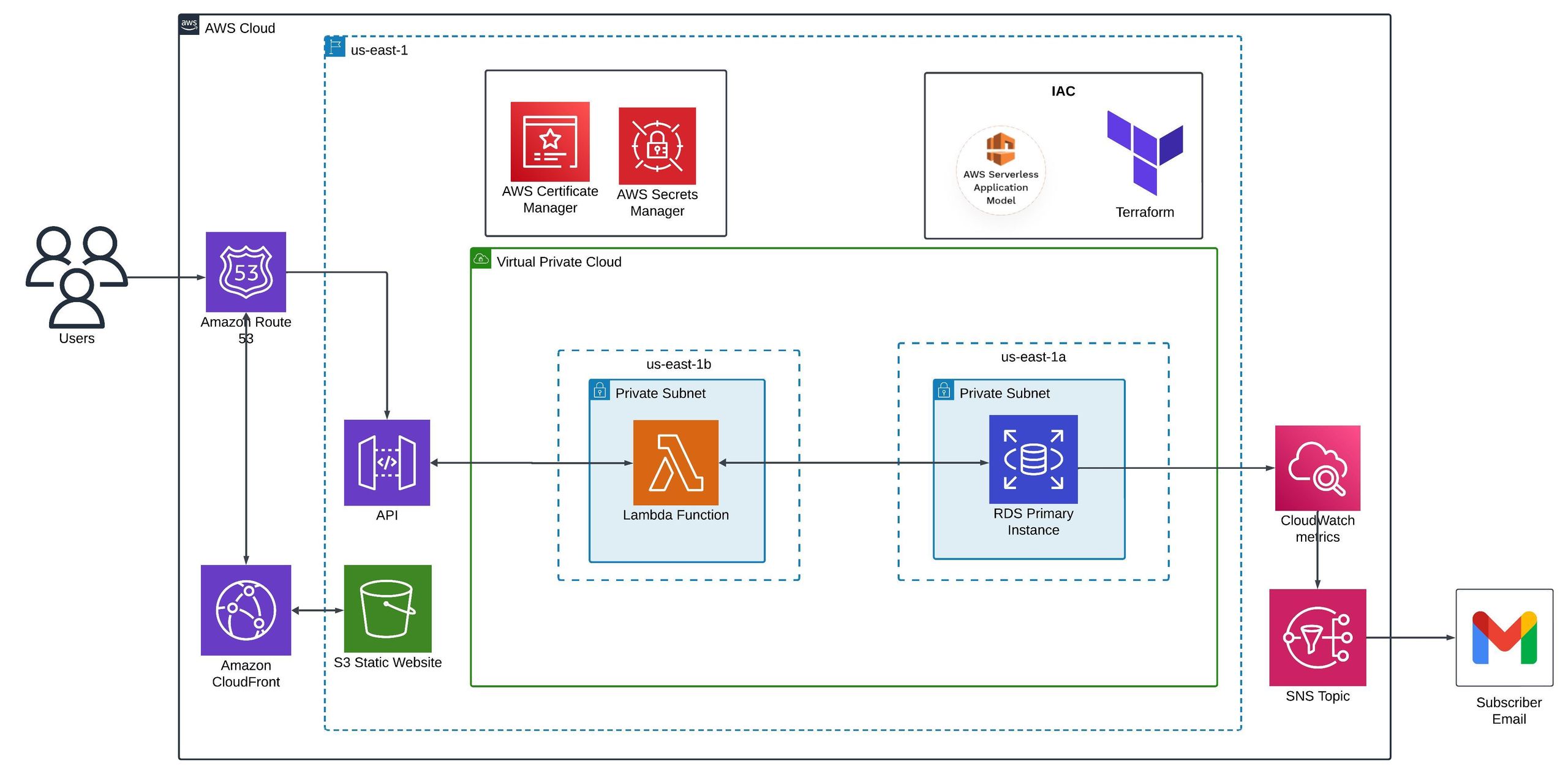
We’ll deploy a Serverless CRUD application with the following architecture:
- API Gateway: Serves as the entry point for the CRUD operations (Create, Read, Update, Delete).
- AWS Lambda: Handles the business logic for CRUD operations.
- Amazon RDS: A MySQL RDS instance to store the data.
- AWS Secrets Manager: Stores the RDS Database password securely.
- Amazon VPC: Lambda will be inside the VPC to securely connect with the RDS database.
- S3 Bucket: Hosting Static Frontend Website.
The infrastructure will be defined using Terraform, while SAM will manage the API and Lambda function deployment.
Step-by-Step Deployment of CRUD Application on AWS Lambda
Step 1: Provision Infrastructure with Terraform
We will use Terraform community modules to provision the resources. Refer to this link for Terraform modules: Terraform Registry. The following resources will be provisioned:
1) VPC with Private Subnets:
Start by creating the VPC. Using the VPC module, we can provide inputs to make the VPC, private and database subnets, internet gateway, and DNS hostnames with just a few lines of code.
2) Security Groups for Lambda and RDS:
Next, we can create security groups using the Terraform module. We have made two security groups:
- Lambda function: Outbound rule to allow all traffic out to all addresses.
- RDS instance: Only allows incoming traffic on port 3306 (MySQL) from the Lambda security group.
3) RDS Database Instance:
We will create a MySQL RDS instance. We have specified the instance type as db.t3.micro. Specify the engine version and storage, and attach the previously created security group.
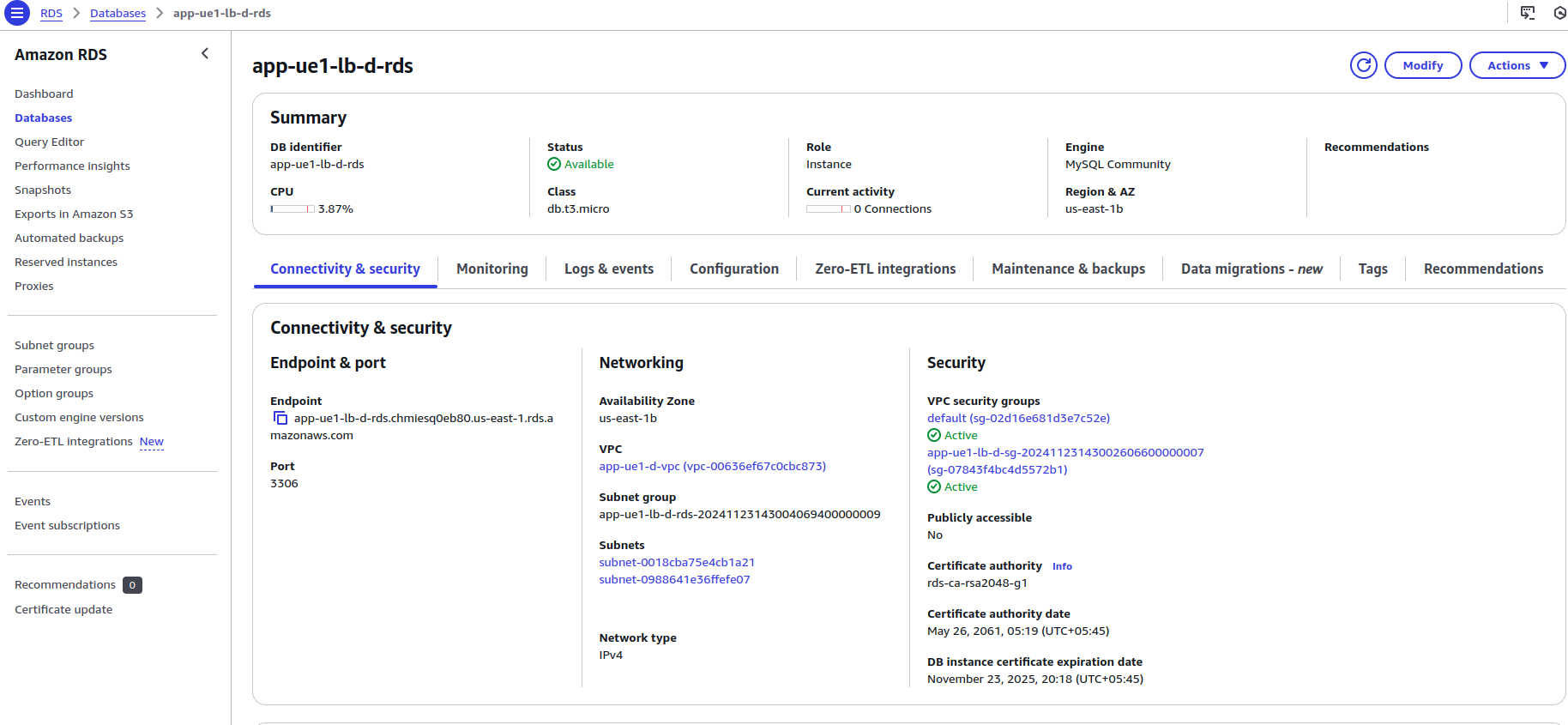
Provide the database subnet IDs as the DB Subnet group. Specify the master username and the port (3306 by default).
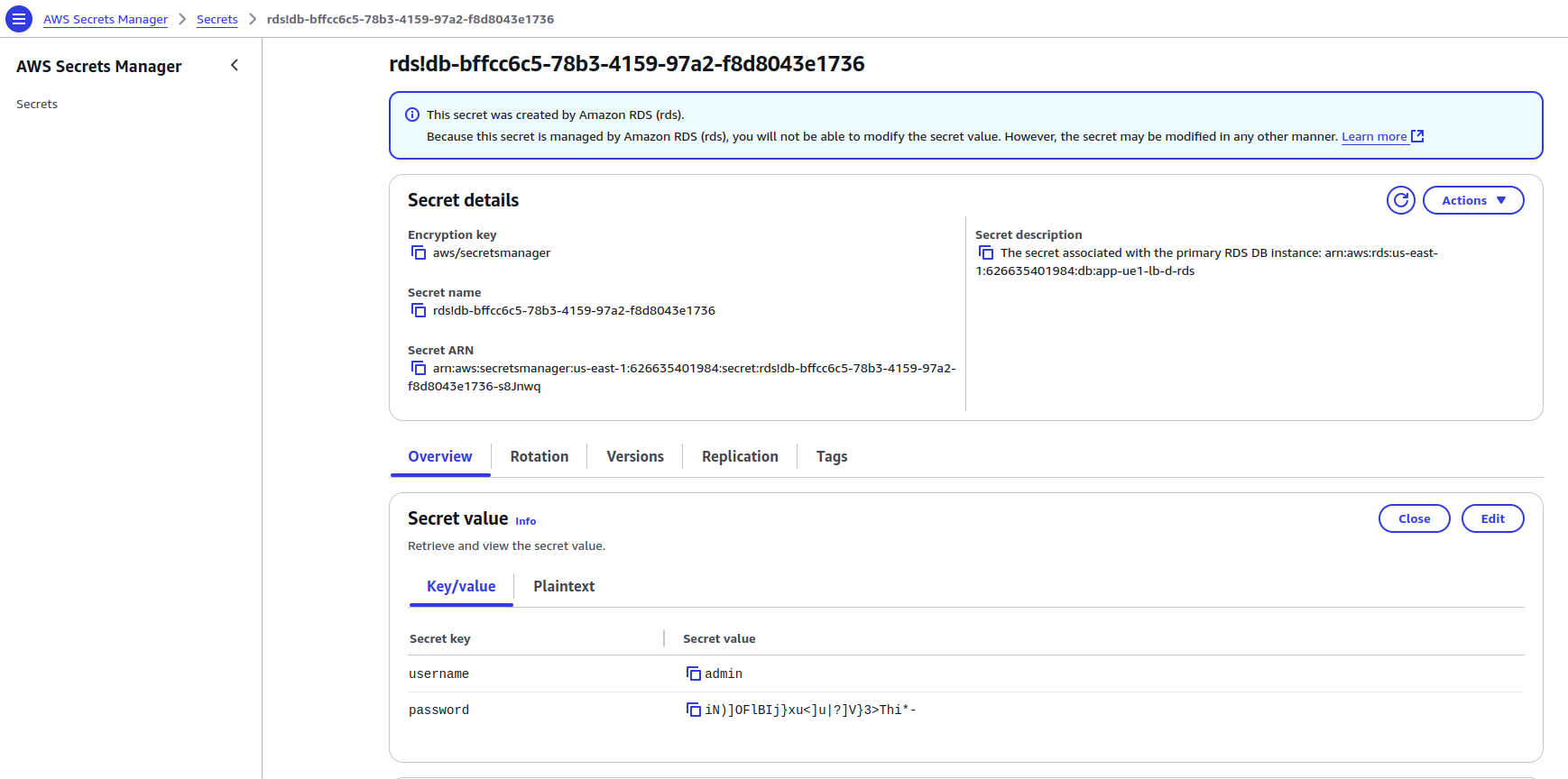
If a password is not specified, Secrets Manager will automatically create and store it.
4) Resources for Frontend Hosting:
4.1) S3: Create the S3 bucket for uploading the front-end application files. We have made it private by blocking public access and enabling force destruction.
Since we will be using CloudFront to cache the static files in edge locations, we need to add a bucket policy to allow the CloudFront distribution to perform. GetObject API on our S3 Bucket.
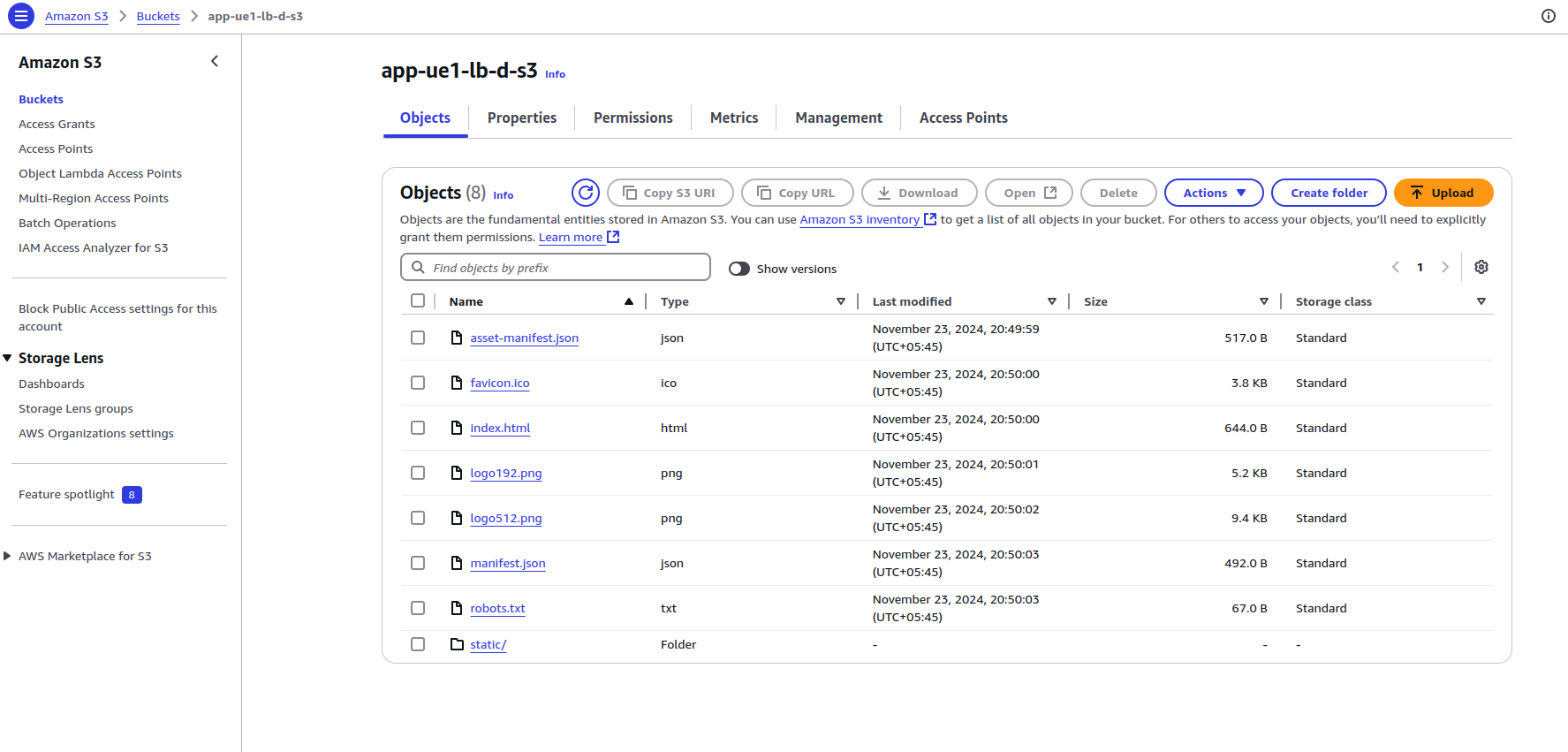
For the Frontend application, we are using this simple React application: GitHub – safak/youtube2022 at react-mysql.
We build the React file and upload the build files to the S3 bucket.
4.2) ACM: Create an SSL Certificate using the Amazon Certificate Manager(ACM) module. We will create a certificate for the domain using Route 53. The validation method is set to DNS.
4.3) CloudFront: Create the CloudFront distribution and set the domain name as an alias ( secondary domain name).
Specify the S3 bucket as the origin and create the Origin Access Control/Identity to allow only the distribution to access the bucket.
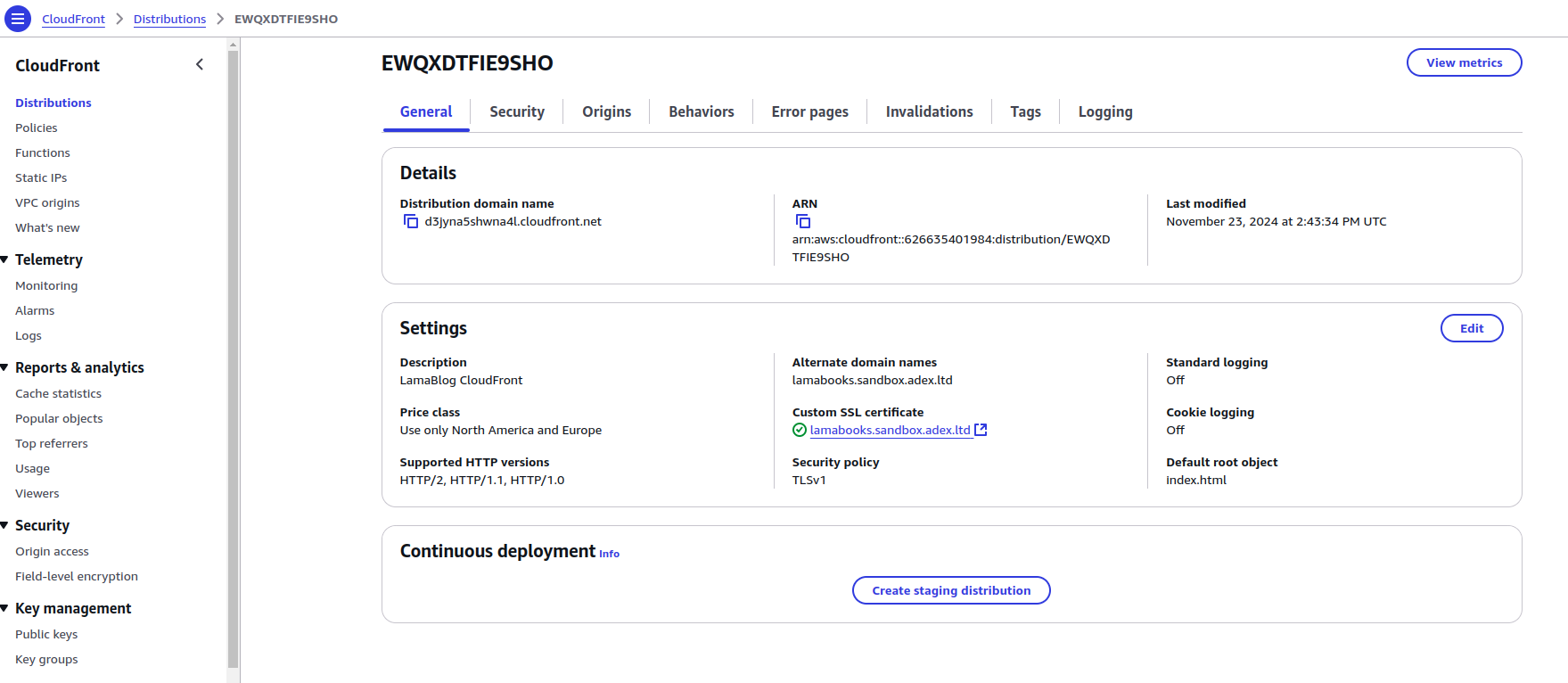
Create the default cache behavior and provide the ACM certificate as the viewer certificate.
4.4) Route 53: Create a Route 53 record of type A (IPv4 Address or some AWS Service) with the CloudFront distribution endpoint as the alias. Note that you need to create the Route 53 hosted zone before creating the record. I used an existing hosted zone.
5) Monitoring and Notifications:
- Create an SNS Topic with a topic policy allowing AWS events to publish messages. We have added an email address as a subscriber to this topic.
- Create Cloudwatch metric alarms with the SNS Topic as the alarm_actions so that a message is published on that topic when an alarm is created.
Provide the dimension attribute to specify the particular resource whose metrics are monitored for alarm.
We have created three alarms: CpuUtilization, FreeStoragePercentage, and Active Connections in the RDS Instance.
6) Initializing Terraform Configurations
Now, define your AWS provider and initialize the state backend (you can use S3 as a backend).
provider "aws" {
  region = "us-east-1"
}
terraform {
  required_version = "~> 1.0"
  required_providers {
    aws = {
      source  = "hashicorp/aws"
      version = "~> 5.0"
    }
  }
}
Run the following commands to apply configurations:
terraform init
terraform apply
Step 2: Setup AWS SAM to Deploy the Serverless Application
AWS SAM will manage the Lambda function and API Gateway for the CRUD application. Learn more about SAM and SAM templates.
1) Create a SAM Application:
Start by creating a SAM application with the following command:
sam initSelect the runtime of your choice (e.g., Python, Node.js). After initialization, SAM will generate a template file, template.yaml. We have chosen Python 3.12 as the lambda runtime.
2) Define Lambda and API in the Template
In your template.yaml, define the Lambda functions and the API Gateway resources. We will be using the pymysql library to connect to the RDS MySQL database, so we are passing the dependency as a Lambda layer.
Refer to this blog to learn about creating a custom lambda layer.
Step 2.1: Set Up Lambda in VPC and API Gateway Trigger
Create the SAM template and write the necessary attributes, such as Transform and Resources. Under Resources, we will define the AWS services (Lambda function, API, and Lambda Layer).
Let’s configure the Lambda resource with Type AWS::Serverless::Function first. Provide the necessary properties, such as runtime, architectures, FunctionName, MemorySize, CodeUri, and Handler. We will also reference the PyMysqlLayer, which we will configure later.
Add policies to give the Lambda execution role the necessary permissions. We can provide SAM template policies as well as inline policies.
Since our Lambda function needs to connect to the RDS Database, we must put the Lambda inside a VPC. Provide the SubnetIds and Security Group IDs.
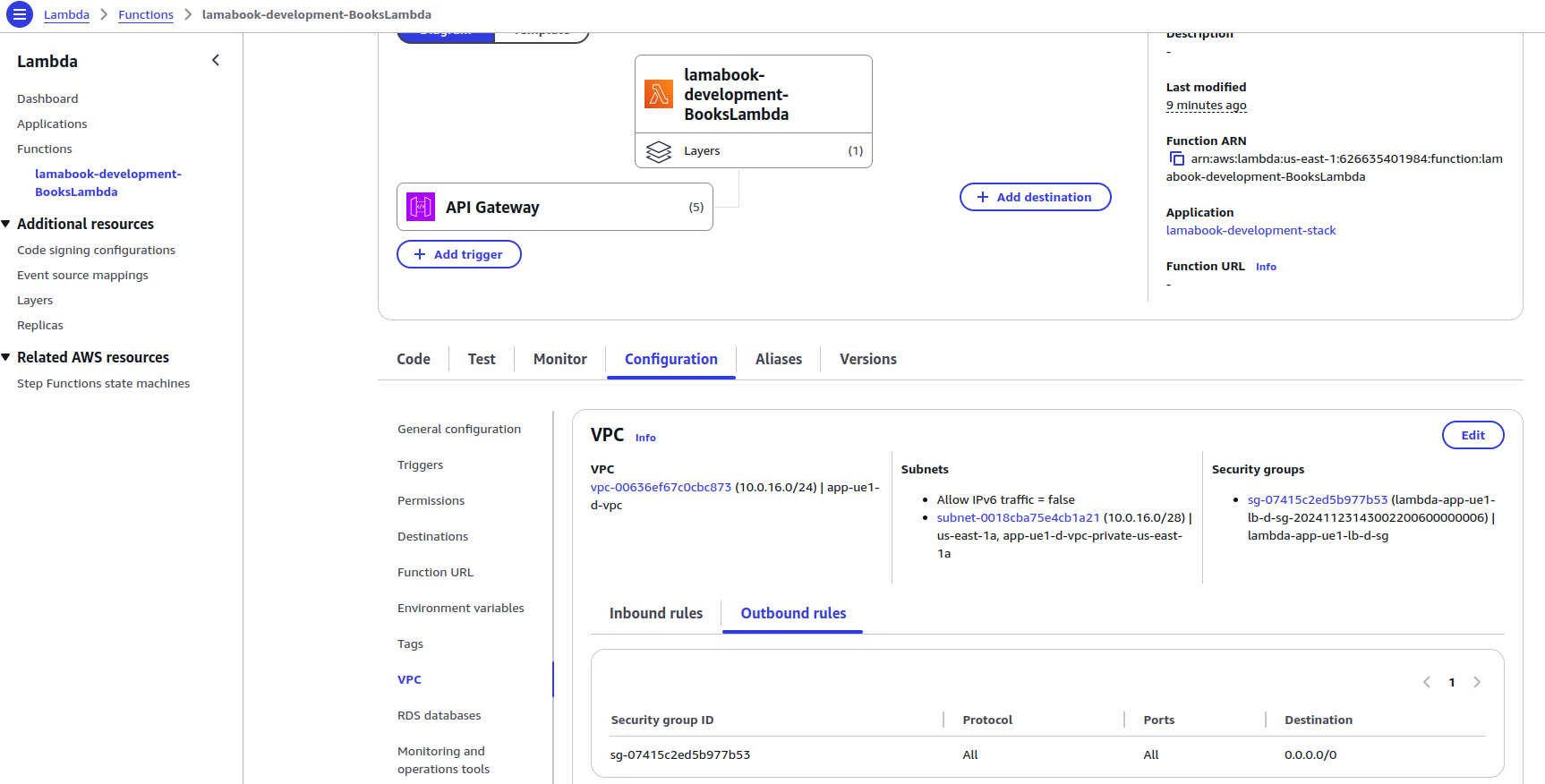
We can also set Environment variables for the Lambda function from the SAM template. We can use the Ref intrinsic function, like in CloudFormation, to reference other resources and Parameters (basically like variables in CloudFormation and SAM).
Subnet IDs, Security Group ID for Lambda, and RDS information are provided through Parameters. Currently, these values are provided statically.
We can pass them dynamically using the GitHub Actions workflow or TaskFile.
Resources:
  BooksLambda:
    Type: AWS::Serverless::Function
    Properties:
      Runtime: python3.12
      Timeout: 180
      Architectures: [x86_64]
      FunctionName: "BooksLambda"
      MemorySize: 128
      CodeUri: lambda/
      Handler: books.lambda_handler
      Layers:
        - Ref: PyMysqlLayer
      Policies:
        - AWSLambdaVPCAccessExecutionRole
        - Statement:
          - Sid: GetSecrets
            Effect: Allow
            Action:
            - secretsmanager:GetSecretValue
            Resource: !Ref SECRET
      VpcConfig:
        SecurityGroupIds: !Ref LambdaSG
        SubnetIds: !Ref PrivateSubnetIds
      Environment:
        Variables:
          RDS_PROXY_HOST: !Ref RDSHOST
          USERNAME: !Ref USERNAME
          DB_NAME: !Ref DBNAME
          SECRET: !Ref SECRET
          REGION: !Ref REGION
          DOMAIN: !Ref DOMAIN
To allow Lambda integration with API Gateway and set the API to trigger the Lambda function, add Events properties in the Lambda function resource, provide the Type as Api, and specify the API path, method, and RestApiId.
We are adding APIs for GET, POST, PUT, and DELETE Methods.
    Events:
        AddBook:
          Type: Api
          Properties:
            Path: /books
            Method: POST
            RestApiId: !Ref BooksApi
        GetBooks:
          Type: Api
          Properties:
            Path: /books
            Method: GET
            RestApiId: !Ref BooksApi
        DeleteBook:
          Type: Api
          Properties:
            Path: /books/{id}
            Method: DELETE
            RestApiId: !Ref BooksApi
        GetBook:
          Type: Api
          Properties:
            Path: /books/{id}
            Method: GET
            RestApiId: !Ref BooksApi
        UpdateBook:
          Type: Api
          Properties:
            Path: /books/{id}
            Method: PUT
RestApiId: !Ref BooksApi 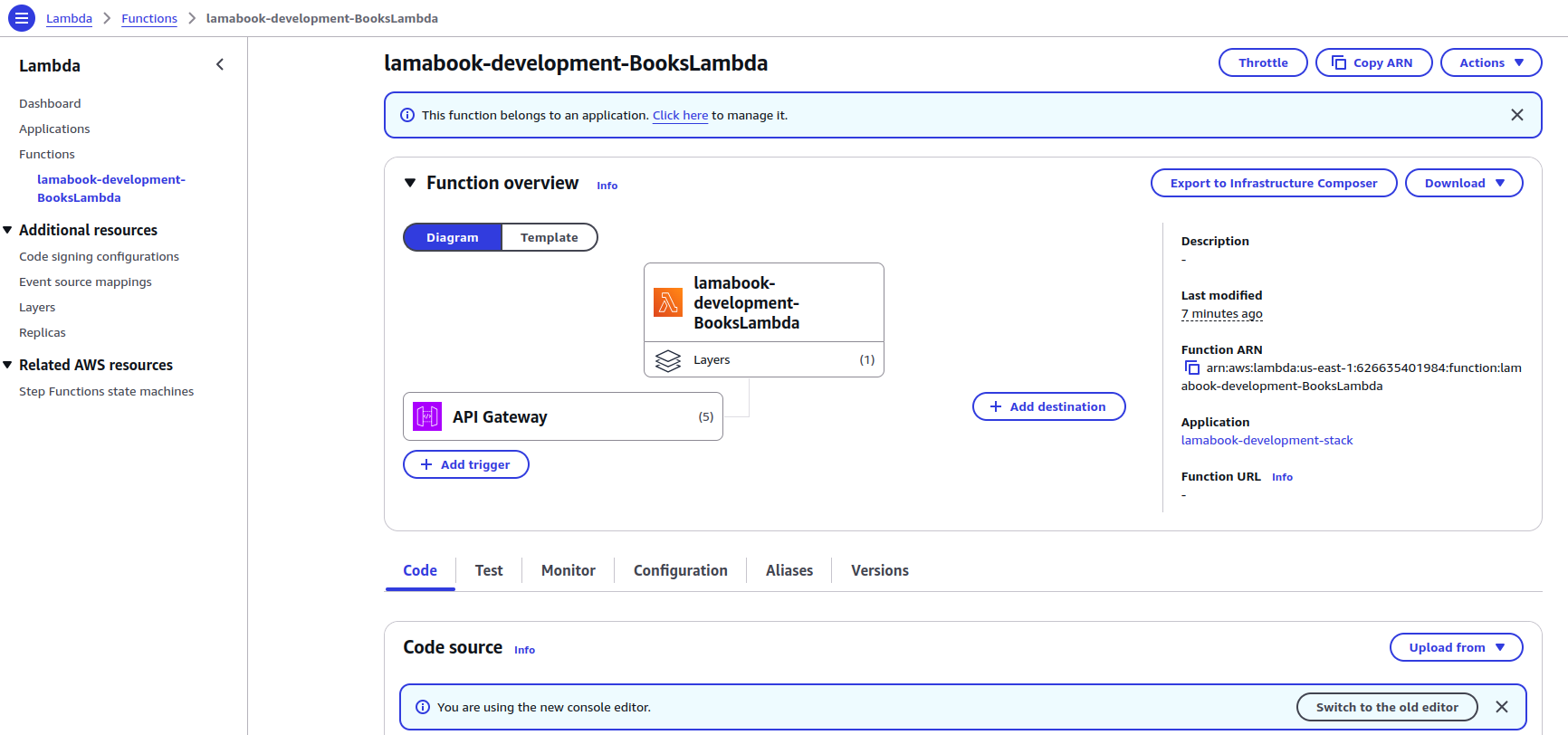
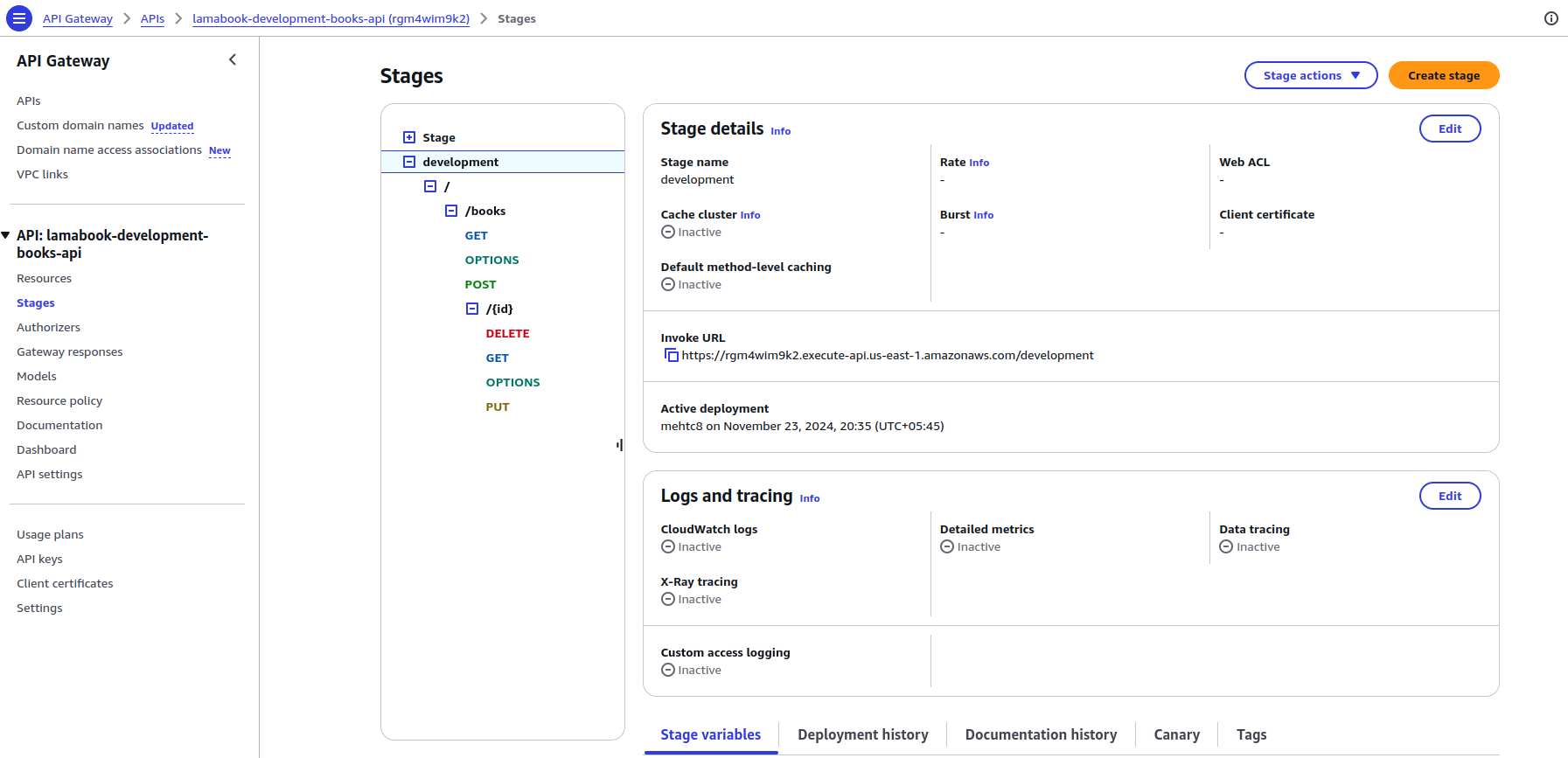
Step 2.2: Set Up API Gateway Resource and Development Stage
Define the configurations for the API resource with Type: AWS::Serverless::Api. Provide necessary properties for the API, such as the Stage in which to deploy it.
Likewise, allow CORS as the front end is running under a different domain name. We have only set up the domain for the Front End and are using the API Invoke URL for the Backend API.
  BooksApi:
    Type: AWS::Serverless::Api
    Properties:
      EndpointConfiguration: REGIONAL
      Name: "books-api"
      StageName: "development"
      Cors:
        AllowMethods: "'GET,POST,PUT,DELETE,OPTIONS'"
        AllowHeaders: "'content-type'"
        AllowOrigin: !Ref Domain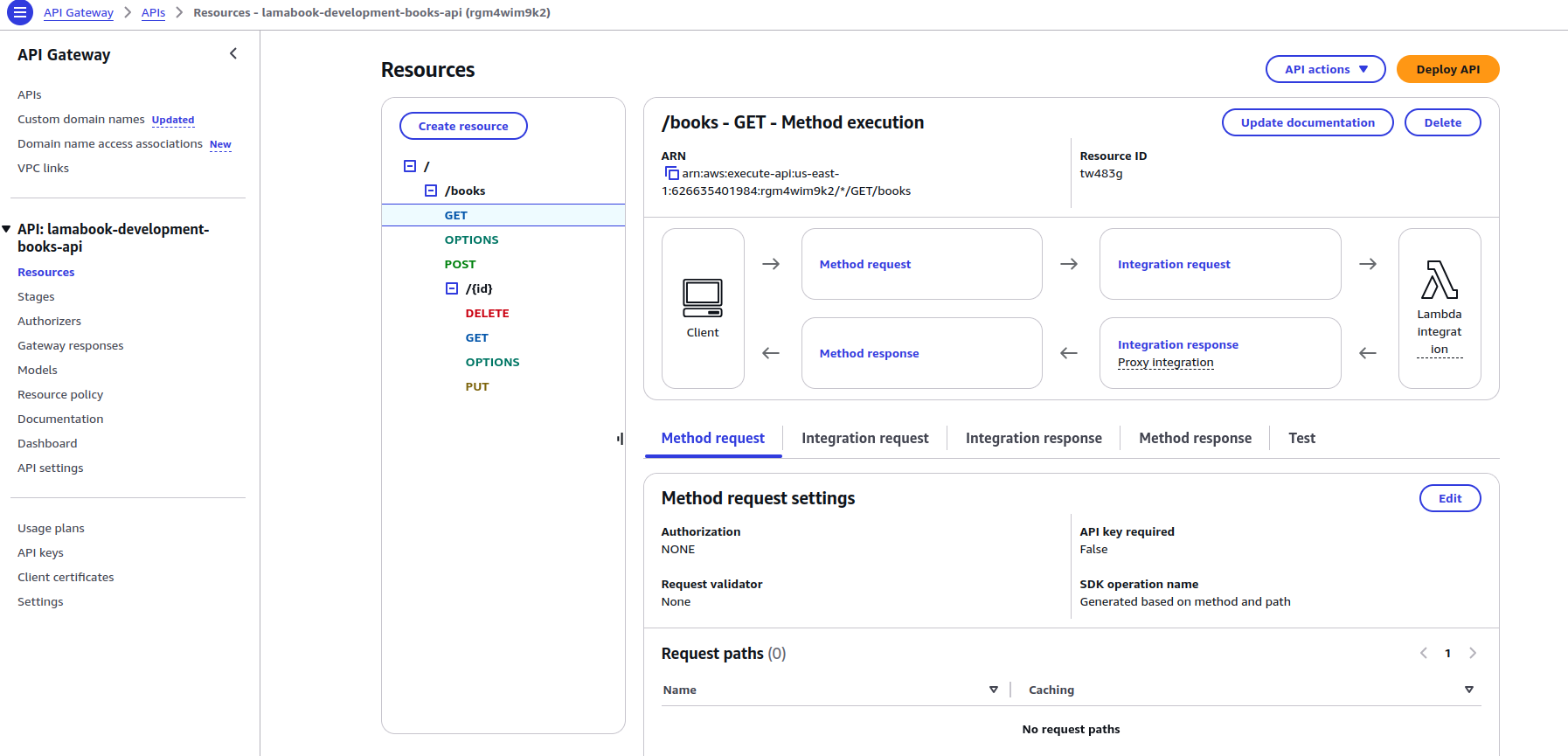
Step 2.3: Configuring Lambda Layers for PyMySQL Dependency
Create Lambda layers if any external packages/ dependencies are required. We will use the pymysql library to connect to the RDS MySQL database. So, we are passing the dependency as the Lambda layer.
  PyMysqlLayer:
    Type: AWS::Serverless::LayerVersion
    Properties:
      ContentUri: Layers/pymysql
      CompatibleRuntimes:
        - python3.12
        - python3.11
      CompatibleArchitectures:
        - x86_64
        - arm64
    Metadata:
      BuildMethod: python3.12
      BuildArchitecture: x86_64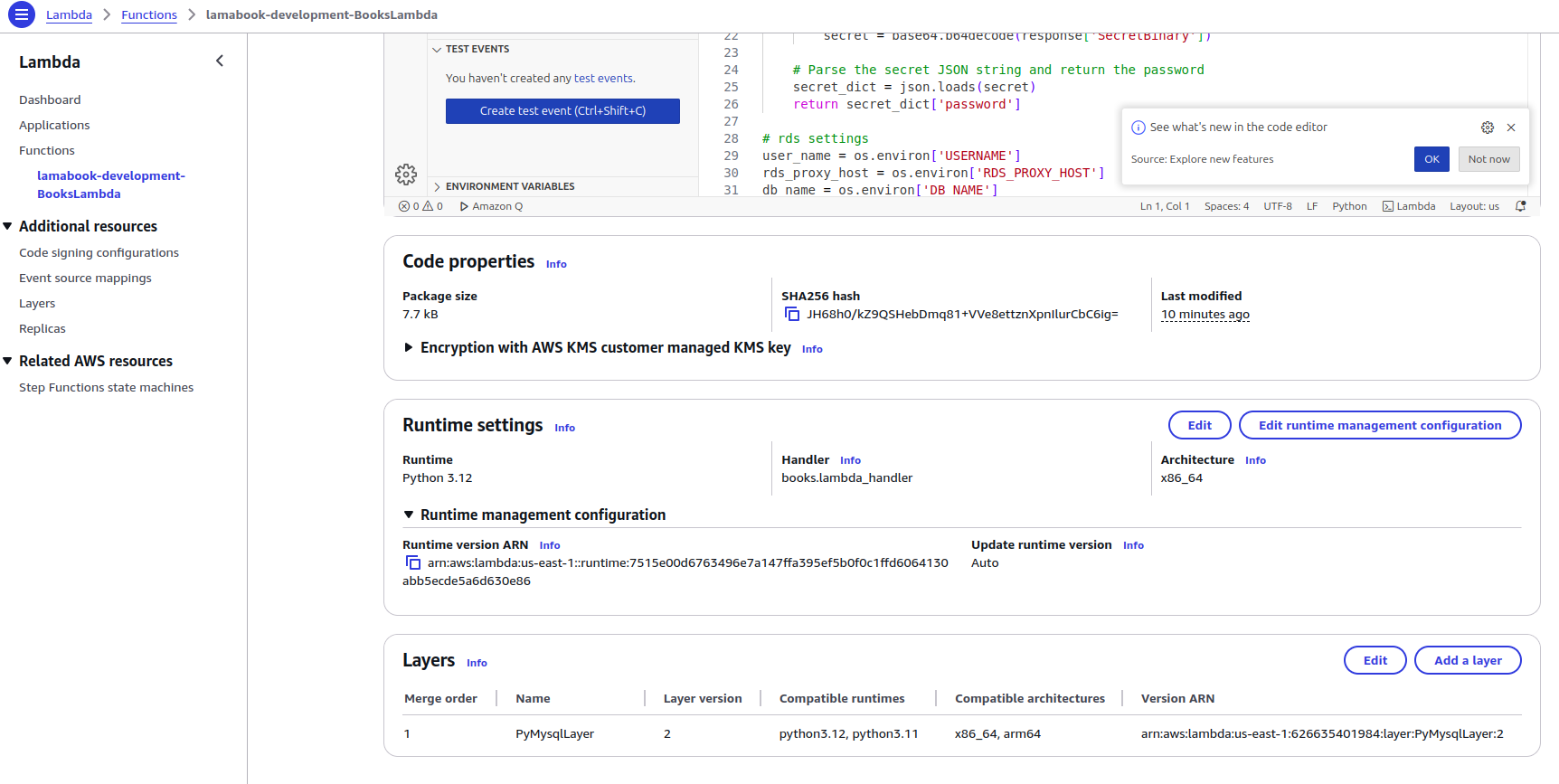
Note: You can define Parameters in the SAM template as follows:
Parameters:
  LambdaSG:
    Type: CommaDelimitedList
    Default: sg-03df20d6d512982   #Replace with the Lambda SG ID
  PrivateSubnetIds:
    Type: CommaDelimitedList
    Default: "subnet-0605e6lsak11666c06"
You can override the Parameters using SAM CLI as well with –parameter-overrides <Parameter_Name>=<Parameter_Value>
3) Configure the Lambda Function
Write the lambda function to handle the backend logic. Using the pymysql library, modify the Lambda function code to include the connection logic to connect it with the RDS instance.
To optimize execution time, keep the database connection logic outside the lambda handler.
Likewise, we have defined the build_response function to return a structured HTTP response to the API, ensuring the response is properly formatted with the right headers and body content.
We have defined the individual functions for handling the CRUD operations. Inside the lambda handler, we define which function to invoke based on the HTTP Method to the API.
import sys
import pymysql
import json
import os
import boto3
import decimal

# Getting RDS Password
def get_secret():
    client = boto3.client('secretsmanager', region_name=os.environ['REGION'])
    secret = client.get_secret_value(SecretId=os.environ['SECRET'])['SecretString']
    return json.loads(secret)['password']

# Establish connection
def connect_db(db=None):
    return pymysql.connect(
        host=os.environ['RDS_HOST'],
        user=os.environ['USERNAME'],
        passwd=get_secret(),
        db=db,
        connect_timeout=5
    )

conn = connect_db()
with conn.cursor() as cur:
    cur.execute("CREATE DATABASE IF NOT EXISTS books")
    cur.execute("""
        CREATE TABLE IF NOT EXISTS books (
            id INT AUTO_INCREMENT PRIMARY KEY,
            title VARCHAR(255) NOT NULL,
            `desc` TEXT,
            price DECIMAL(10, 2) NOT NULL,
            cover VARCHAR(255)
        )
    """)
    conn.commit()
    conn.close()

def build_response(status_code, body):
    return {
        'statusCode': status_code,
        'body': json.dumps(body, cls=DecimalEncoder),
        'headers': {
            'Content-Type': 'application/json',
            'Access-Control-Allow-Origin': os.environ['DOMAIN']
        }
    }

class DecimalEncoder(json.JSONEncoder):
    def default(self, obj):
        return str(obj) if isinstance(obj, decimal.Decimal) else super().default(obj)

def lambda_handler(event, context):
    path, method, params = event.get('path'), event.get('httpMethod'), event.get('pathParameters')
    body = json.loads(event.get('body', '{}')) if event.get('body') else {}

    routes = {
        ('GET', '/books/{id}'): lambda: get_book(params['id']),
        ('GET', '/books'): get_books,
        ('POST', '/books'): lambda: save_book(body),
        ('PUT', '/books/{id}'): lambda: modify_book(params['id'], body),
        ('DELETE', '/books/{id}'): lambda: delete_book(params['id'])
    }

    return routes.get((method, path), lambda: build_response(404, 'Not Found'))()

def query_db(query, args=None, fetch=False):
    with connect_db('books').cursor() as cur:
        cur.execute(query, args)
        conn.commit()
        return cur.fetchall() if fetch else None

def get_book(book_id):
    result = query_db("SELECT * FROM books WHERE id = %s", (book_id,), fetch=True)
    return build_response(200, result) if result else build_response(404, 'Book not found')

def get_books():
    rows = query_db("SELECT * FROM books", fetch=True)
    return build_response(200, rows)

def save_book(body):
    query_db("INSERT INTO books (title, `desc`, price, cover) VALUES (%s, %s, %s, %s)",
             (body['title'], body['desc'], body['price'], body['cover']))
    return build_response(200, "Book added")

def modify_book(book_id, body):
    query_db("""
        UPDATE books SET title=%s, `desc`=%s, price=%s, cover=%s WHERE id=%s
    """, (body['title'], body['desc'], body['price'], body['cover'], book_id))
    return build_response(200, f"Book ID {book_id} updated")

def delete_book(book_id):
    query_db("DELETE FROM books WHERE id = %s", (book_id,))
    return build_response(200, f"Book ID {book_id} deleted")
4) Build and Deploy your SAM application:
Use the following code:
sam build
sam deploy --guided
During deployment, provide the required parameters, such as stack name, region, etc.
Alternatively, you can define the SAM configurations with samconfig.toml file as follows:
version = 0.1
[default.deploy.parameters]
stack_name = "example-stack"
s3_bucket = "example-bucket"
s3_prefix = "example-crud"
region = "us-east-1"
confirm_changeset = false
capabilities = "CAPABILITY_IAM"
disable_rollback = true
parameter_overrides = "Stage=\"development\""
Then, you can deploy the SAM application with the following command:
sam deploy- If you had other environments (e.g., dev, prod), you could define the parameters using the same samconfig.toml file under [prod.deploy.parameters] and [dev.deploy.parameters. To deploy specific environments, use the –config-env flag:
sam deploy --config-file samconfig.toml --config-env prod Following all the above steps, we will set up a serverless CRUD application with a static frontend site hosted on S3 behind a CloudFront Distribution and using API Gateway and Lambda for the backend.
Conclusion
With SAM and Terraform, we’ve successfully deployed a serverless CRUD application in AWS backed by an RDS database. Using SAM simplifies managing the serverless stack, while Terraform provides fine control over the infrastructure.
This architecture provides scalability, cost-effectiveness, and ease of management, making it ideal for modern applications.
We can automate the deployment process for further improvements using GitHub Actions, Taskfile, or other CICD platforms.














