

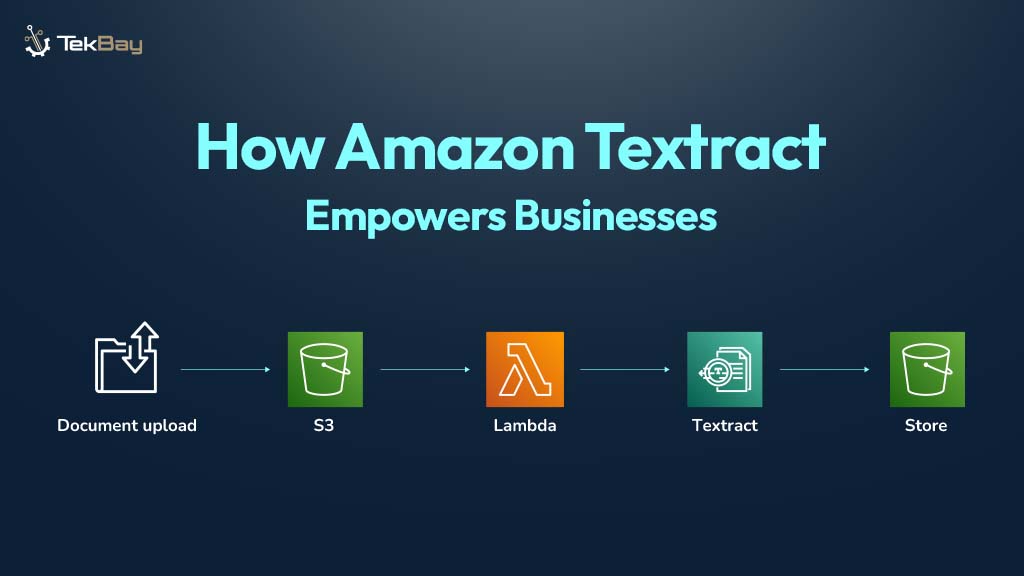
The ability to quickly extract valuable insights from documents is crucial. However, managing and processing unstructured data from various formats, like invoices, contracts, and medical records, can be a daunting task. Manual extraction is not only slow but prone to errors.
Amazon Textract revolutionizes this process by using AI to automatically extract structured data from documents, transforming how businesses manage and use their data. With Textract, organizations can streamline document workflows, reduce manual effort, and make faster, more informed decisions.
What is Amazon Textract?
Amazon Textract is a fully managed service by AWS that transcends traditional OCR by extracting structured data from scanned documents, images, and PDFs.
Textract leverages machine learning to not only detect text but also to understand the structure and context of documents. This means Textract can identify key-value pairs, tables, and other relevant data, turning unstructured information into actionable insights.
For example, when processing an invoice, Textract doesn’t just extract text. It identifies specific fields like the invoice number, vendor name, date, and line items in tables, delivering structured data ready for integration into business processes.
Key Features of Amazon Textract
Here’s why Amazon Textract is a powerful tool for document automation:
1. Advanced Text Detection
Textract can extract printed text and even handwriting from scanned documents, images, and PDFs. This flexibility allows it to handle a wide range of formats, from receipts to legal documents.
2. Form Data Extraction
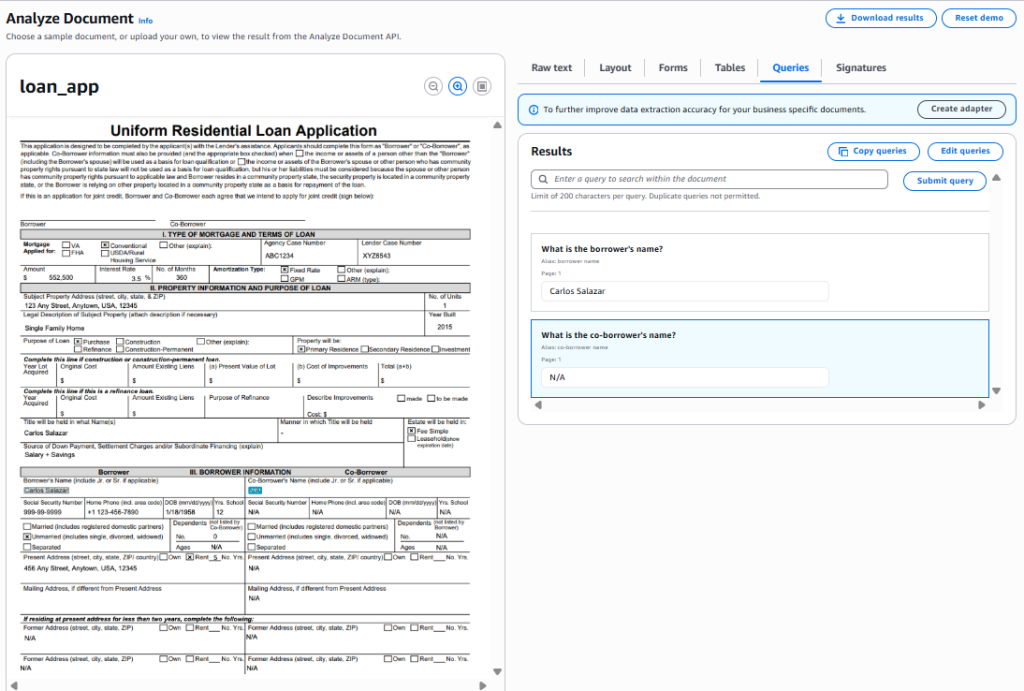
One of Textract’s most potent features is its ability to extract key-value pairs from forms (e.g., “Vendor Name: Acme Corp” or “Amount Due: $500”). This eliminates the need for complex custom parsers and ensures seamless automation.
3. Table Extraction
Textract preserves the structure of tables, making it ideal for processing financial reports, invoices, or spreadsheets. By maintaining the context of tables, Textract ensures data is easily integrated into other systems.
4. Seamless AWS Integration
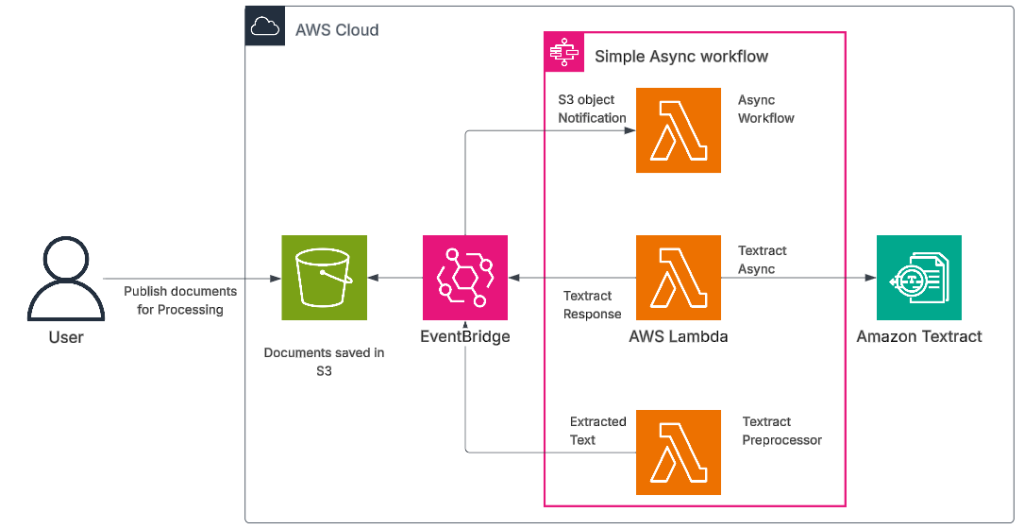
Textract integrates seamlessly with other AWS services, including Amazon S3 (for storage), AWS Lambda (for automation), Amazon SNS (for notifications), Amazon Comprehend (for text analysis), and AWS Step Functions (for orchestration). This makes building end-to-end document processing pipelines simple.
5. Security and Compliance
As part of the AWS ecosystem, Textract adheres to stringent security standards. Data is encrypted both in transit and at rest. It also complies with key regulations such as GDPR, HIPAA, and PCI DSS.
How Amazon Textract Works
Here’s a simplified breakdown of the process:
Step 1: Upload Your Document
Start by uploading documents (e.g., PDF, image) to Amazon S3. Textract supports multiple formats like PDFs, PNGs, TIFFs, and JPEGs.
Step 2: Invoke the Textract API
Use the AWS SDKs or AWS CLI to invoke Textract’s AnalyzeDocument or DetectDocumentText API. Textract processes the document and returns structured data in JSON format.
Step 3: Process the Results
Textract returns text, key-value pairs, tables, and relationships between data blocks. This data can then be parsed for integration into downstream systems or workflows.
Step 4: Automate the Workflow
Use AWS Lambda to automate the entire process. For instance, when a document is uploaded to S3, Lambda can trigger Textract and store the results for further processing. You can also use Amazon SNS for notifications when the extraction is complete.
How Amazon Textract Powers Generative AI Applications
Amazon Textract not only enhances document processing but also plays a crucial role in Generative AI (GenAI) workflows. Textract’s structured data can be used to train AI models, enabling them to generate summaries, reports, and even new documents.
Here’s how Textract integrates into GenAI applications:
Document Data Extraction for AI Models
Textract extracts key data that is used to train AI models, such as Generative Pretrained Transformers (GPT). For example, data extracted from invoices or contracts can be used to generate content like summaries or new documents.
Integration with Amazon Comprehend for NLP
After extracting data, you can use Amazon Comprehend for Natural Language Processing (NLP) tasks like sentiment analysis or entity recognition, making Textract a cornerstone of intelligent AI applications.
AI-Driven Document Generation
Amazon SageMaker can use Textract’s data to train generative models that create new documents. For instance, you can automatically generate financial reports based on extracted invoice data.
Query-Based AI Applications
Combine Textract’s extracted data with Amazon Lex to build systems where users can ask natural language questions and receive answers based on the document.
Practical Use Cases of Amazon Textract in Gen AI
Textract can be used for several AI-driven applications, such as:
Automated Document Summarization
Textract extracts data from long documents (e.g., legal contracts, medical records), enabling AI models to automatically generate concise summaries.
Invoice and Receipt Automation
Textract automates invoice processing by extracting data (e.g., vendor name, amount) and feeding it into AI models for tasks like generating financial reports or initiating approval workflows.
Chatbots for Document Q&A
By combining Textract’s data with AWS Lex, you can create intelligent chatbots that can answer user queries based on document data. This is useful in sectors like healthcare or law.
Content Generation
Textract’s extracted data can help generate new documents automatically. For example, generating contracts, invoices, or reports based on structured input.
Code Sample: Using Amazon Textract with Python
Here’s a simple example of how to interact with Amazon Textract using Python and the AWS SDK (Boto3):
import boto3

# Create a Textract client
textract = boto3.client('textract')

# Specify the document's location in S3
response = textract.analyze_document(
    Document={'S3Object': {'Bucket': 'your-bucket', 'Name': 'invoice.png'}},
    FeatureTypes=['FORMS', 'TABLES']  # Extract both form and table data
)

# Process and print key-value pairs
for block in response['Blocks']:
    if block['BlockType'] == 'KEY_VALUE_SET':
        print(f"Key: {block['Key']['Text']}, Value: {block['Value']['Text']}")
This code demonstrates how to:
- Upload a document to S3.
- Use Textract’s analyze_document API to extract both forms and table data.
- Process and print key-value pairs from the results.
Why Choose Amazon Textract?
- Increased Efficiency: Automates manual document processing, reducing human error and saving time.
- Scalability: Handles large volumes of documents, processing thousands or even millions without the need for custom infrastructure.
- Accuracy: Textract’s machine learning models are tailored to handle documents with high accuracy.
- Cost-Effective: With the flexible pay-as-you-go model, you only pay for what you process.
- Enhanced Automation: Structured data enables deeper AI-powered automation, leading to faster decision-making and more efficient workflows.
Conclusion
Amazon Textract is more than just an OCR tool; it’s an AI-powered solution that automates document data extraction, enabling businesses to streamline workflows and make faster, smarter decisions. By converting unstructured data into actionable insights, Textract transforms how organizations manage documents, making processes faster, more accurate, and scalable.














