


In today’s fast-paced digital landscape, web applications and APIs must scale seamlessly as traffic grows. Ensuring your system can handle this load without sacrificing performance makes load testing essential.
A powerful tool like Artillery.io streamlines load testing by enabling simulations of real-world traffic and helping teams identify performance bottlenecks early on.
This guide will cover using Artillery.io for effective load testing and demonstrate how to connect it with Artillery Cloud for real-time reporting and team collaboration.
What is Artillery.io?
Artillery.io is an open-source load-testing tool for apps running on HTTP, WebSocket, and Socket.io protocols. Its YAML-based configuration files and cloud reporting make it highly user-friendly and popular among developers and testers.
Key Features:
- YAML-based configuration for defining test scenarios.
- Cloud reporting for real-time and historical tracking of load test results.
- Seamless integration with CI/CD pipelines for automated testing.
Why Choose Artillery.io for Load Testing?
This tool’s key advantages are its adaptability and simplicity. Beginners can quickly set up complex scenarios with YAML files, while advanced users benefit from cloud reporting and traffic simulations.
Here’s why Artillery.io stands out among load-testing tools:
- Simple yet powerful configurations: YAML files make load test setup effortless.
- Cloud-based collaboration: Artillery Cloud provides real-time reporting and team collaboration.
- Flexible versions: Choose between the open-source or Pro-version for distributed testing.
Prerequisites
Ensure Node.js is installed on your machine. To run Artillery.io, you’ll need the latest LTS version of Node.js. Visit the official Node.js website for installation instructions.
Installing Artillery
To install Artillery globally, use this command:
npm install -g artillery@latestIf you encounter permission issues, use administrative privileges:
sudo npm install -g artillery@latestVerify that Artillery is installed successfully by running:
artillery --versionCreating Your First Load Test Script
Artillery scripts are defined using simple YAML files. Create a directory for your load test and write your first test script.
mkdir artillery-load-tests
cd artillery-load-tests
nano load-test.yml
Copy and paste the following YAML configuration into load-test.yml to define load-test scenarios:
config:
  target: 'http://asciiart.artillery.io:8080'
  phases:
    - duration: 60
      arrivalRate: 10
      rampTo: 20
      name: Ramp up load
    - duration: 60
      arrivalRate: 20
      name: Steady load

scenarios:
  - name: Get animal pictures
    flow:
      - loop:
        - get:
            url: "/dino"
        - get:
            url: "/pony"
        - get:
            url: "/armadillo"
        count: 50
Running the Load Test
To execute your load test script, run the following command:
artillery run load-test.ymlTip: Start with lower loads and gradually increase to avoid overwhelming your system during initial tests.
Analyzing Results
After the test is completed, you can save the report for future reference:
artillery run --output report.json load-test.ymlYour results will include valuable metrics such as:
- Response times: Track average, median, and percentile-based response times.
- Request rates: Monitor the number of requests processed per second.
- Error rates: Identify the percentage of failed requests.
Posting Results to Artillery Cloud
Using Artillery Cloud makes real-time collaboration, tracking, and long-term storage of load test data easy. Here’s how to configure it so that results may be posted.
Step 1: Sign Up for Artillery Cloud
Head over to Artillery Cloud and sign up. You can log in using GitHub for easy access.
On the Artillery Log-in page, click ‘Login with GitHub.’

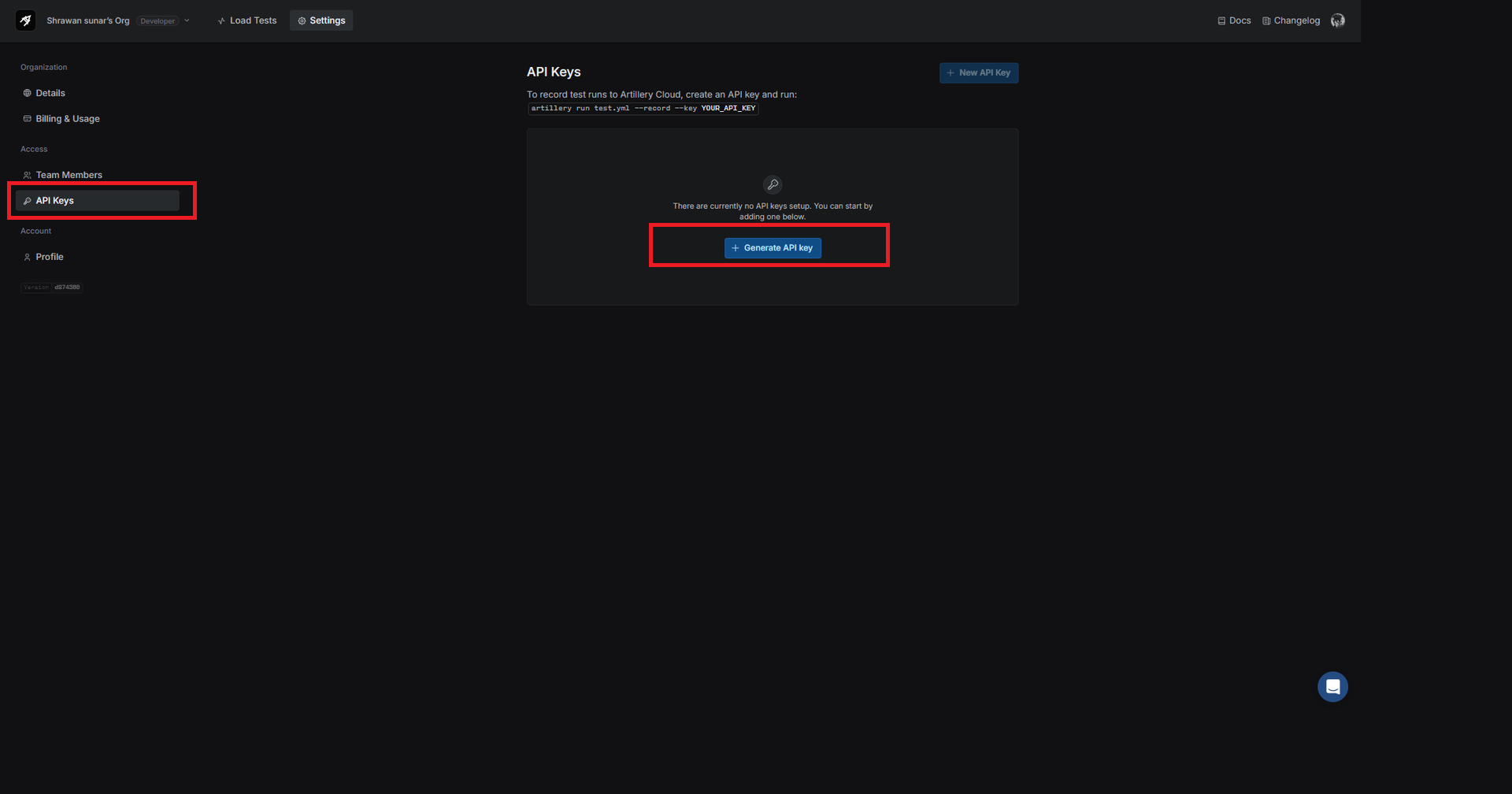
Step 2: Generate an API Key
You’ll need an API key to post your test results to Artillery Cloud. Here’s how to get one:
- In your Artillery Cloud dashboard, click on your profile avatar.
- Go to API keys and click Generate API key. Copy this key for use in your test.
Step 3: Running Tests with Cloud Reporting
To post your test results to Artillery Cloud, run the following command, replacing YOUR_API_KEY with the API key you just generated:
artillery run load-test.yml --record --key YOUR_API_KEYStep 4: Viewing Cloud Reports
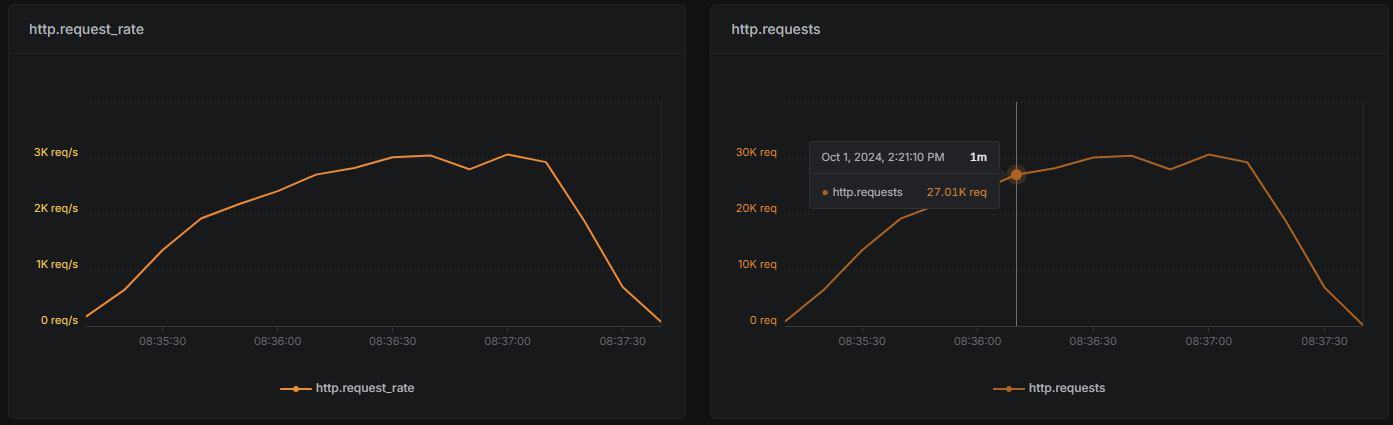
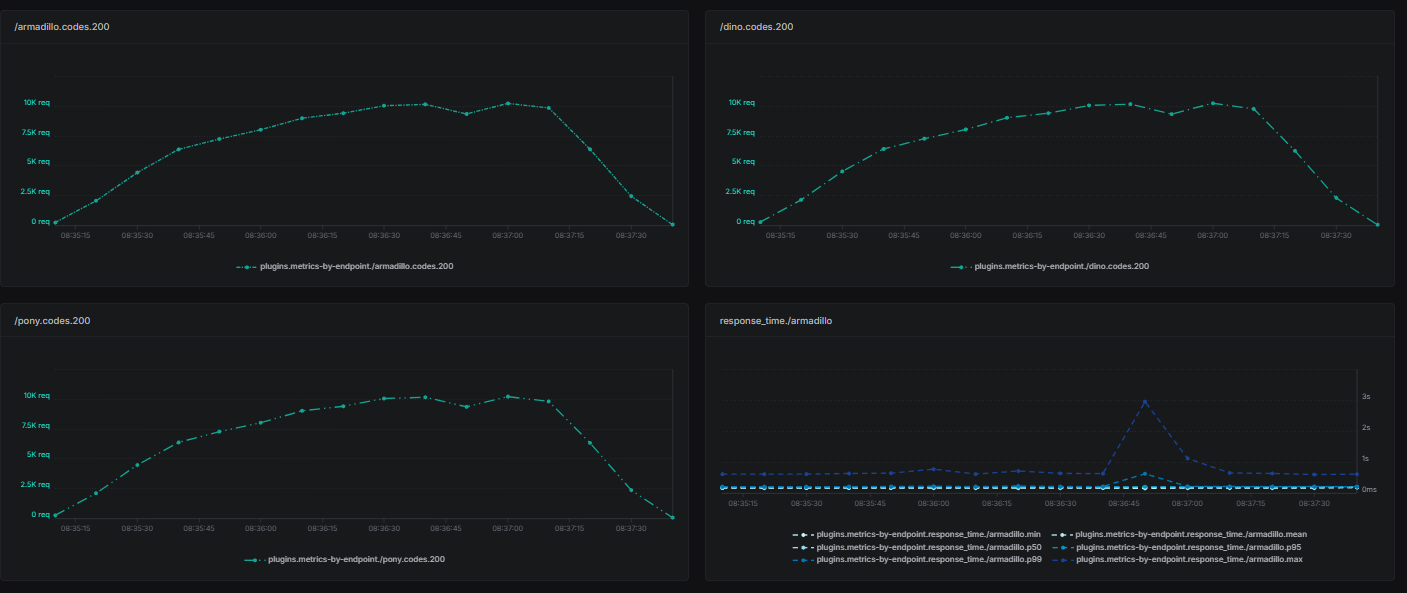
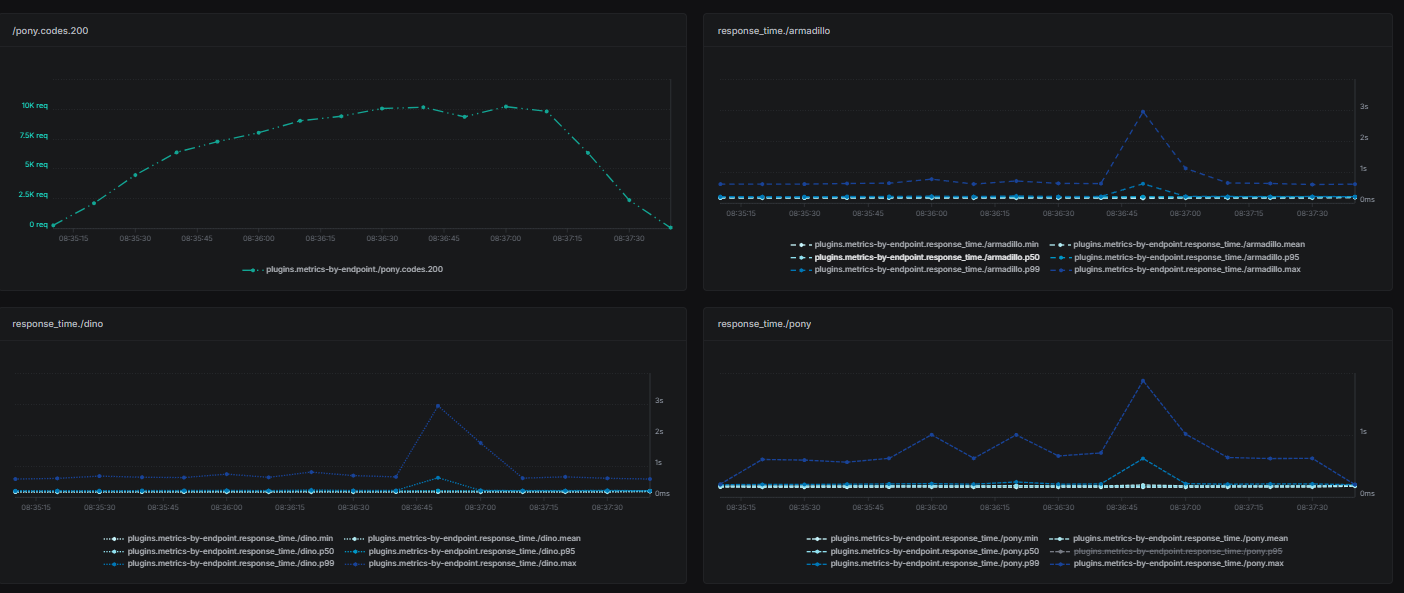
Once your test is completed, you can view detailed reports in the Artillery Cloud dashboard, including:
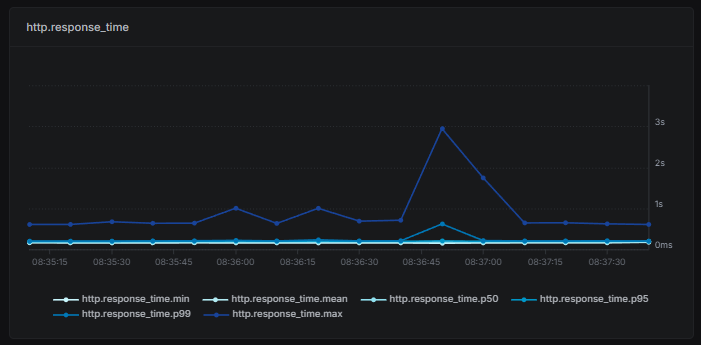
- Response times (average, median, and percentiles).
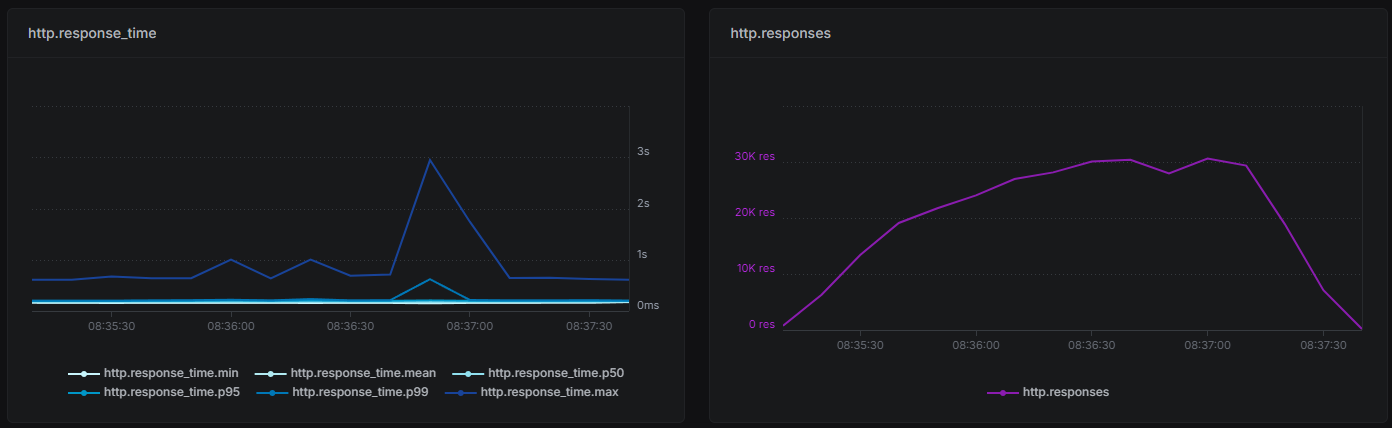
- Throughput: Requests handled per second.
- Endpoint status and response time for each tested endpoint.
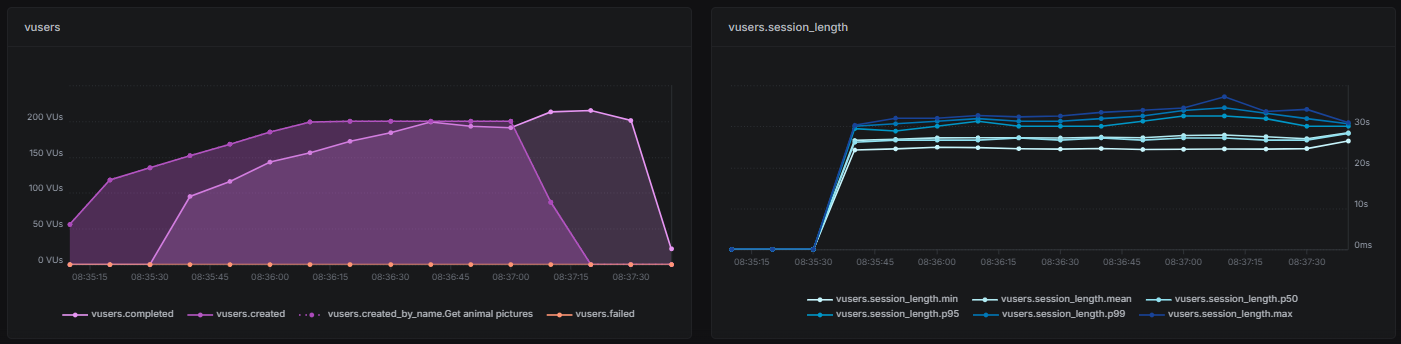
- Virtual User: Created Vusers and their session length in Artillery load testing
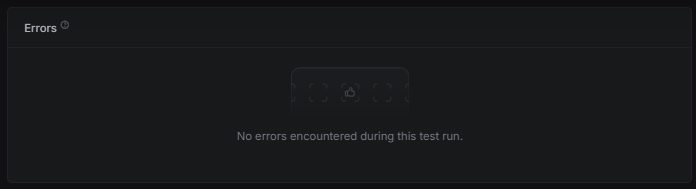
- Error rates: Percentage of failed requests.
- Latency: Response time under different loads.
Best Practices for Load Testing with Artillery.io
To maximize the value of load testing with Artillery, consider the following best practices:
- Start small: Begin with lower loads and gradually increase.
- Simulate real-world scenarios: Create user journeys that reflect actual application usage.
- Monitor system resources: Track CPU, memory, and database usage during tests to identify potential bottlenecks.
- Leverage Artillery Cloud: Use it for real-time collaboration and long-term performance tracking.
- Automate with CI/CD: Integrate Artillery into your CI/CD pipeline for continuous load testing.
Conclusion
Artillery.io is a powerful yet user-friendly load-testing tool that meets the demands of modern performance testing. Its integration with CI/CD pipelines and cloud-based reporting features makes it an essential tool for developers and testers.
This step-by-step guide lets you set up, execute, and analyze load tests with Artillery.io and Artillery Cloud.
To ensure that your application can manage any traffic volume, try a variety of scenarios and progressively increase the testing volume.
To enhance your application’s performance, start your load-testing journey with Artillery.io today!













