


Handling millions of payment transactions requires a scalable, resilient, and efficient system. Achieving these takes just a swift move from a traditional server-based approach to serverless payment processing.
Indeed, serverless architecture delivers undeniable advantages: automatic scaling, cost efficiency, and reduced operational overhead. However, serverless computing has its setbacks: managing data states, finding bugs, and dealing with time limits.
That’s why a well-architected approach is essential. By combining AWS tools like Lambda, SQS, Step Functions, and DynamoDB, we can build an efficient and flexible payment processing system that ensures smooth operation even under heavy loads.
Challenges Of Serverless Payment Processing System: Its Solutions
Serverless architecture may not be the silver bullet due to its unique challenges. For instance, since serverless functions have execution time limits, they may face issues while handling long tasks.
Or, let’s say a function with a higher workload depends on another function that scales more slowly. The interdependence of these components may make it difficult to fix problems and grow your application.
Yet, these limitations can be mitigated with the proper configurations and design patterns. Here is a great solution using AWS services:
- AWS Lambda for event-driven execution without needing to provision or manage servers, reducing overhead.
- Amazon SQS for asynchronous and decoupled messaging to ensure different parts can work independently.
- AWS Step Functions orchestrate workflows by coordinating the execution of tasks in a reliable and scalable sequence, enabling better control over multi-step payment processes.
- Transaction records are persistently stored in AWS DynamoDB, a highly scalable, low-latency NoSQL database that ensures faster data access and real-time processing.

You May Need To Consider: As with any architecture, security remains a crucial consideration in serverless systems.
Prerequisites
To build a scalable serverless payment processing system, you will need the following:
- AWS account to access and configure AWS services.
- Basic knowledge of Python to write and manage Lambda functions.
- Basic understanding of cloud computing and serverless application models.
Step-by-Step Implementation
Step 1: API Gateway → Lambda Function (Receiving Payment Requests)
In this step, API Gateway triggers a Lambda function when a payment request is received.
The function processes the payment and forwards transaction details to an SQS queue for further asynchronous handling.
1.1 API Gateway Configuration
The API Gateway is set up to accept POST requests at the dynamic endpoint /integrate/pay/{method}. It supports CORS for cross-origin requests.
ApiGatewayApi:
    Type: AWS::Serverless::Api
    Properties:
      Cors:
        AllowMethods: "'POST', 'GET', 'OPTIONS'"
        AllowHeaders: "'Content-Type,X-Amz-Date,Authorization,X-Api-Key,X-Amz-Security-Token'"
        AllowOrigin: "'*'"
1.2 Lambda Function Configuration
API Gateway triggers the Lambda function through a POST request. This function processes the payment request and sends the details to the SQS queue.
InitialLambdaFunction:
    Type: AWS::Serverless::Function
    Properties:
      Handler:
      CodeUri:
      Runtime: python3.10
      MemorySize: 128
      Timeout: 30
      Environment:
        Variables:
          SQS_QUEUE_URL: !Ref SQSMessageQueue
      Tracing: Active
      Events:
        ApiPOST:
          Type: Api
          Properties:
            Path: /integrate/pay/{method}
            Method: POST
            RestApiId:
              Ref: ApiGatewayApi
      Role: !Sub ${SQSMessageIntegrationRole.Arn}
Step 2: Lambda Function → SQS (Message Queue for Decoupling)
In this step, the Lambda function forwards payment requests to an SQS queue for decoupling and asynchronous processing. This setup enhances fault tolerance and prevents API Gateway timeouts.
2.1 SQS Queue Configuration
The SQS queue acts as a buffer between the API-triggered Lambda function and the downstream processing components. We can define the SQS resource as:
SQSMessageQueue:
    Type: AWS::SQS::Queue
Since the Lambda function does not have permission to send messages to SQS by default, we must define an IAM role with the necessary permissions.
2.2 IAM Role for SQS Access
The IAM role grants the Lambda function permissions to send messages to the SQS queue.
SQSMessageIntegrationRole:
    Type: AWS::IAM::Role
    Properties:
      AssumeRolePolicyDocument:
        Version: "2012-10-17"
        Statement:
          - Effect: Allow
            Principal:
              Service: lambda.amazonaws.com
            Action:
              - sts:AssumeRole
      Policies:
        - PolicyName: logs
          PolicyDocument:
            Statement:
              - Effect: Allow
                Action:
                  - logs:CreateLogGroup
                  - logs:CreateLogStream
                  - logs:PutLogEvents
                Resource: arn:aws:logs:*:*:*
        - PolicyName: sqs
          PolicyDocument:
            Statement:
              - Effect: Allow
                Action:
                  - sqs:SendMessage
                Resource: !Sub ${SQSMessageQueue.Arn}
Note:
- The SendMessage action enables the Lambda function to send messages to the queue.
- Additional permissions like ReceiveMessage and DeleteMessage can be added if needed for further processing.
2.3 Lambda Handler Implementation
The following Python (boto3) Lambda function reads the method parameter from the request and sends it to the SQS queue.
import json
import boto3
import os

SQS_QUEUE_URL= os.environ["SQS_QUEUE_URL"]

def lambda_handler(event, _):
    method = event.get("pathParameters", {}).get("method")
    sqs_client = boto3.client("sqs")
    sqs_client.send_message(
        QueueUrl=SQS_QUEUE_URL, MessageBody=json.dumps({"method":method})
    )
Boto3 is a toolkit of Amazon’s Python that works with AWS resources. For more information, refer to the Boto3 Official Documentation.
Example Of Lambda Trigger and SQS Data Flow
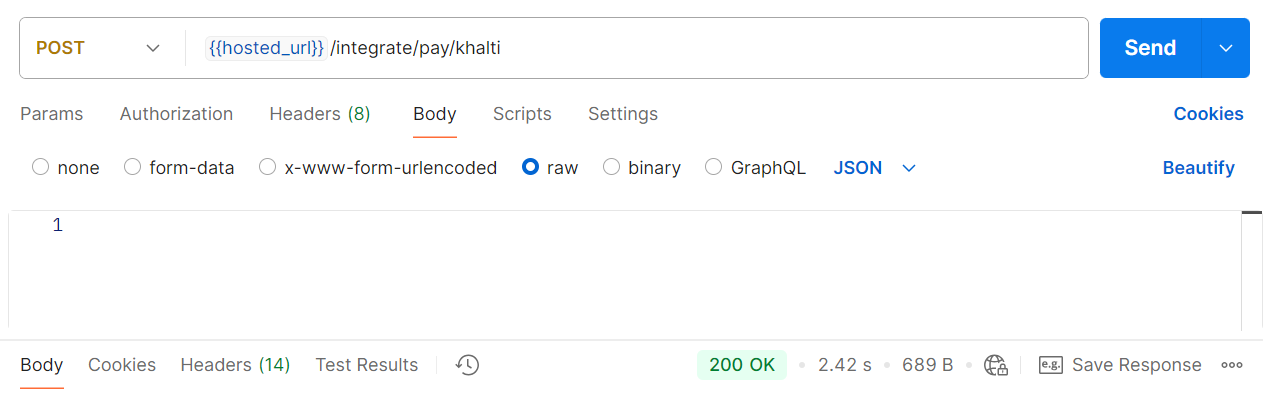
Below is an example of a POST request sent to the /integrate/pay/khalti endpoint. The API Gateway triggers the Lambda function, which processes the request by extracting the method parameter (e.g., ‘Khalti’) and sends it to the SQS queue.
The API responds with a 200 OK status, confirming the successful processing of the request.
After the Lambda function processes the request, the method parameter (e.g., ‘Khalti’) is passed as a message to the SQS queue for asynchronous processing.

Step 3: SQS → Step Function (Workflow Orchestration)
AWS Step Functions allows developers to implement logic in different functions separately and in an orderly way. It also allows parallel execution and is as easy to debug and change.
In this workflow, Step Functions processes messages from SQS and invokes Lambda functions to handle payment processing. It coordinates multiple AWS services, including Lambda, SQS, and EventBridge.
3.1 Defining and Implementing the Step Function State Machine
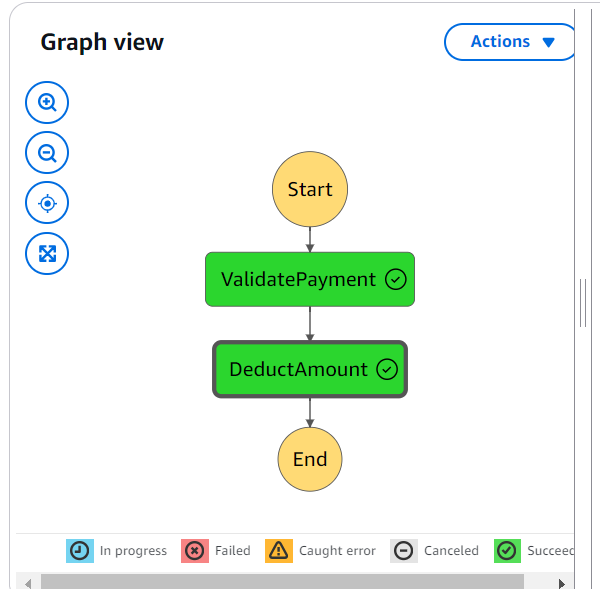
To create a workflow, we define a State Machine using Amazon States Language (ASL) in JSON format. The state machine orchestrates a workflow consisting of two tasks, each invoking an AWS Lambda function: ValidatePayment and DeductAmount.
Below is the CloudFormation definition for the Step Function:
StateMachineProcess:
    Type: AWS::StepFunctions::StateMachine
    Properties:
      StateMachineName: StateMachineProcess
      DefinitionString: !Sub |
      TracingConfiguration:
        Enabled: true
      RoleArn: !GetAtt StateMachineRole.Arn
The JSON_FORMAT_DEFINATION is arranged as below:
{
          "Comment": "Arrange multiple Lambda functions",
          "StartAt": "ValidatePayment",
          "States": {
            "ValidatePayment": {
              "Type": "Task",
              "Resource": "${ValidatePayment.Arn}",
              "Parameters": {
                "Payload.$": "$"
              },
              "Retry": [
                {
                  "ErrorEquals": ["Lambda.TooManyRequestsException"],
                  "IntervalSeconds": 2,
                  "MaxAttempts": 5,
                  "BackoffRate": 2.0
                }
              ],
              "Next": "DeductAmount"
            },
            "DeductAmount": {
              "Type": "Task",
              "Resource": "${DeductAmount.Arn}",
              "Parameters": {
                "Payload.$": "$"
              },
              "Retry": [
                {
                  "ErrorEquals": ["Lambda.TooManyRequestsException"],
                  "IntervalSeconds": 2,
                  "MaxAttempts": 5,
                  "BackoffRate": 2.0
                }
              ],
              "End": true
            }
          }
        }
3.2 IAM Role for Step Function
Unlike SQS, the state machine requires permission to invoke the lambda function. Hence, an IAM role must be defined to grant these permissions.
StateMachineRole:
    Type: AWS::IAM::Role
    Properties:
      AssumeRolePolicyDocument:
        Version: "2012-10-17"
        Statement:
          - Effect: Allow
            Principal:
              Service: states.amazonaws.com
            Action: sts:AssumeRole
      Policies:
        - PolicyName: CloudWatchLogs
          PolicyDocument:
            Version: "2012-10-17"
            Statement:
              - Effect: Allow
                Action:
                  - "logs:CreateLogDelivery"
                  - "logs:GetLogDelivery"
                  - "logs:UpdateLogDelivery"
                  - "logs:DeleteLogDelivery"
                  - "logs:ListLogDeliveries"
                  - "logs:PutResourcePolicy"
                  - "logs:DescribeResourcePolicies"
                  - "logs:DescribeLogGroups"
                Resource: "*"
        - PolicyName: StepFunctionInvokePolicy
          PolicyDocument:
            Version: "2012-10-17"
            Statement:
              - Effect: Allow
                Action:
                  - lambda:InvokeFunction
                Resource:
                  - !GetAtt ValidatePayment.Arn
                  - !GetAtt DeductAmount.Arn
3.3 Lambda Functions for Step Functions
With the above configurations, the state machine is granted access to invoke all the lambda functions within it.
Also, we need to define the lambda functions for the state machine.
ValidatePayment:
    Type: AWS::Serverless::Function
    Properties:
      Handler:
      CodeUri:
      Runtime: python3.10
      MemorySize: 128
      Timeout: 30
      Tracing: Active
      Description: This is lambda function one
DeductAmount:
    Type: AWS::Serverless::Function
    Properties:
      Handler:
      CodeUri:
      Runtime: python3.10
      MemorySize: 128
      Timeout: 30
      Tracing: Active
      Description: This is lambda function two
3.4 Triggering the State Machine from SQS
We use EventBridge Pipes to trigger Step Functions automatically when a message arrives in SQS. The pipe listens to SQS and starts executing the state machine.
SqsToStateMachine:
    Type: AWS::Pipes::Pipe
    Properties:
      Name: SqsToStateMachinePipe
      RoleArn: !GetAtt EventBridgePipesRole.Arn
      Source: !GetAtt SQSMessageQueue.Arn
      SourceParameters:
        SqsQueueParameters:
          BatchSize: 1
      Target: !Ref StateMachineProcess
      TargetParameters:
        StepFunctionStateMachineParameters:
          InvocationType: FIRE_AND_FORGET
EventBridge Pipe also requires permission to read from SQS and launch the State machine. Here’s the IAM role that grants these permissions:
EventBridgePipesRole:
    Type: AWS::IAM::Role
    Properties:
      AssumeRolePolicyDocument:
        Version: 2012-10-17
        Statement:
          - Effect: Allow
            Principal:
              Service:
                - pipes.amazonaws.com
            Action:
              - sts:AssumeRole
      Policies:
        - PolicyName: CloudWatchLogs
          PolicyDocument:
            Version: 2012-10-17
            Statement:
              - Effect: Allow
                Action:
                  - "logs:CreateLogGroup"
                  - "logs:CreateLogStream"
                  - "logs:PutLogEvents"
                Resource: "*"
        - PolicyName: ReadSQS
          PolicyDocument:
            Version: 2012-10-17
            Statement:
              - Effect: Allow
                Action:
                  - "sqs:ReceiveMessage"
                  - "sqs:DeleteMessage"
                  - "sqs:GetQueueAttributes"
                Resource: !GetAtt SQSMessageQueue.Arn
        - PolicyName: ExecuteSFN
          PolicyDocument:
            Version: 2012-10-17
            Statement:
              - Effect: Allow
                Action:
                  - "states:StartExecution"
                Resource: !Ref StateMachineProcess
3.5 Lambda Handler Implementations
We implement two Lambda functions, ValidatePayment and DeductAmount, which work together in a Step-Function workflow.
The ValidatePayment function processes input from SQS and sends it to Step Functions.
import json

# ValidatePayment
def lambda_handler(event, _):
    body = json.loads(event["Payload"][0]["body"])  # Parse the body JSON string
    method = body["method"]  # Access the method key
    return {"statusCode": 200, "body": json.dumps({"method": method})}
The DeductAmount function processes the output of ValidatePayment:
import json

#DeductAmount
def lambda_handler(event, _):
    body = json.loads(event["Payload"]["body"])
    print(body)
The json.loads function is used to parse the body of the payload, allowing DeductAmount to handle the response data. As specified in the state machine, DeductAmount marks the end of the Step Function, completing the workflow.
Step 4: Step Function → DynamoDB (Storing Transaction Data)
After executing the payment workflow in Step Functions, the final step is storing transaction details in Amazon DynamoDB. This enables secure, high-performance data storage and makes transaction records easily accessible.
4.1 Defining the DynamoDB Table
We define a DynamoDB table called MethodTable with the following schema:
MethodTable:
  Type: AWS::DynamoDB::Table
  Properties:
    TableName: MethodTable
    AttributeDefinitions:
      - AttributeName: payment_id
        AttributeType: S
      - AttributeName: payment_method
        AttributeType: S
    KeySchema:
      - AttributeName: payment_id
        KeyType: HASH
      - AttributeName: payment_method
        KeyType: RANGE
    BillingMode: PAY_PER_REQUEST
Key Descriptions:
- Partition Key (
payment_id): Uniquely identifies each transaction.
- Sort Key (
payment_method): Helps in filtering data based on payment methods. PAY_PER_REQUEST: To handle scaling automatically.
4.2 Lambda Function to Store Transactions in DynamoDB
The DeductAmount Lambda function processes transactions and writes them to DynamoDB.
DeductAmount:
  Type: AWS::Serverless::Function
  Properties:
    Handler:
    CodeUri:
    Runtime: python3.10
    MemorySize: 128
    Timeout: 30
    Tracing: Active
    Description: Processes payment and stores transaction details
    Policies:
      - DynamoDBCrudPolicy:
          TableName: !Ref MethodTable
    Environment:
      Variables:
        METHOD_TABLE: !Ref MethodTable
4.3 Writing Data to DynamoDB from Lambda
The Lambda function generates a unique transaction ID and stores the data in DynamoDB.
import json
import boto3
import uuid
import os

METHOD_TABLE= os.environ["METHOD_TABLE"]

def lambda_handler(event, _):
    body = json.loads(event["Payload"]["body"])  # Parse the body JSON string
    method = body["method"]  # Access the method key

    id= str(uuid.uuid4())

    methodDb= boto3.resource("dynamodb")
    dynamo_table = methodDb.Table(METHOD_TABLE)
    dynamo_table.put_item(Item={"payment_method": method, "payment_id": id})

    return {"statusCode": 200, "body": json.dumps({"message": "Stored!!"})}
The boto3 toolkit is used to access DynamoDB resources and store data. We can also update the table items using a unique ID generated using uuid ,ensuring each transaction is uniquely identifiable.
Here is a snapshot of the DynamoDB record of a stored transaction with a unique ID and payment method:

Final Architecture Overview:
- API Gateway triggers Lambda, which sends requests to SQS.
- SQS forwards messages to Step Functions with EventBridge pipes, initiating workflow execution.
- Step Functions coordinate multiple Lambda functions for validation and processing.
- DynamoDB stores transaction details for record-keeping.
Conclusion
The proposed serverless architecture combines AWS Lambda, SQS, Step Functions, and DynamoDB to provide a scalable, efficient, and resilient payment processing system.
The integration of these cloud services enables seamless handling of large transaction volumes. Additionally, leveraging Dead Letter Queues (DLQ) in SQS further enhances the system’s resilience by capturing and isolating failed messages, ensuring better error handling and system reliability.













